
Normal Distribution Curve for Hypothesis Testing Areas
Loading the math board and drawing, please wait…
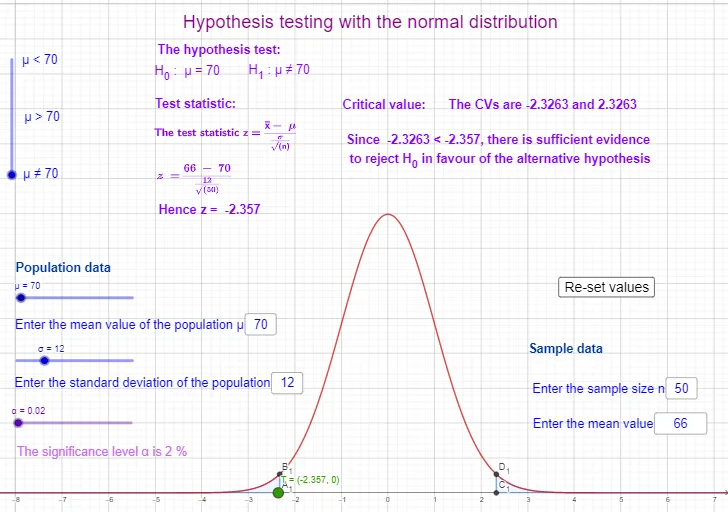
This example demonstrates how changing parameters in a normal distribution turns hypothesis-testing quantities into a clear geometric picture: the curve and its critical regions (tail/interval areas) under a chosen significance level. It centers on the key concepts of the normal distribution (mean μ and standard deviation σ), probability density and distribution behavior, quantiles via the inverse function, and the interpretation of p-values/significance through the area under the curve. Construction in GeoGebra uses Textfield for labeling (μ, σ, α, and intermediate symbols), InverseNormal to compute critical points from input probabilities (e.g., invϕ_1, invϕ_2, invϕ_3), Normal to define the normal distribution curve/functions, Segment to draw vertical boundary lines and interval markers, and Integral to compute the shaded or selected areas corresponding to the test regions (various area/region objects such as A, C, D and related items). Suitable for high school to introductory college statistics/probability, and useful for classroom demonstrations and self-study to connect hypothesis testing logic directly with “critical values + tail probabilities = area under the normal curve.”
GeoGebra Commands & Parameters
Textfield(σ) → InputBox2Textfield(μ) → InputBox1InverseNormal(0, 1, α) → invϕ_1Normal(0, 1, x, false) → fSegment(A, B) → gIntegral(f, (-10^(10)), invϕ_1, true) → i_1Normal(μ, σ, invϕ_1, true) → i_2InverseNormal(0, 1, 1 - α) → invϕ_2Segment(C, D) → hIntegral(f, invϕ_2, 10^(10), true) → i_3Textfield(n) → InputBox3Textfield(x_1) → InputBox4InverseNormal(0, 1, α / 2) → invϕ_3InverseNormal(0, 1, 1 - α / 2) → invϕ_4Integral(f, invϕ_4, 10^(10), true) → i_7Integral(f, (-10^(10)), invϕ_3, true) → i_5Segment(A_1, B_1) → kSegment(C_1, D_1) → l
AI Drawing Prompt Reference
Draw a normal distribution curve to illustrate hypothesis testing areas. Set the mean μ and standard deviation σ via input boxes. Calculate and mark the critical points invϕ_1 and invϕ_2 for significance level α, and draw the normal distribution curve f. Use dashed segments g and h to mark the boundaries for α. Calculate and mark the critical points invϕ_3 and invϕ_4 for α/2, and use dashed segments k and l to mark the boundaries for α/2. Shade areas i_1 to i_7, corresponding to the regions for α and α/2 on both sides.
The prompt above was compiled from the original drawing commands and is for reference only.