
Binomial Hypothesis Testing
Loading the math board and drawing, please wait…
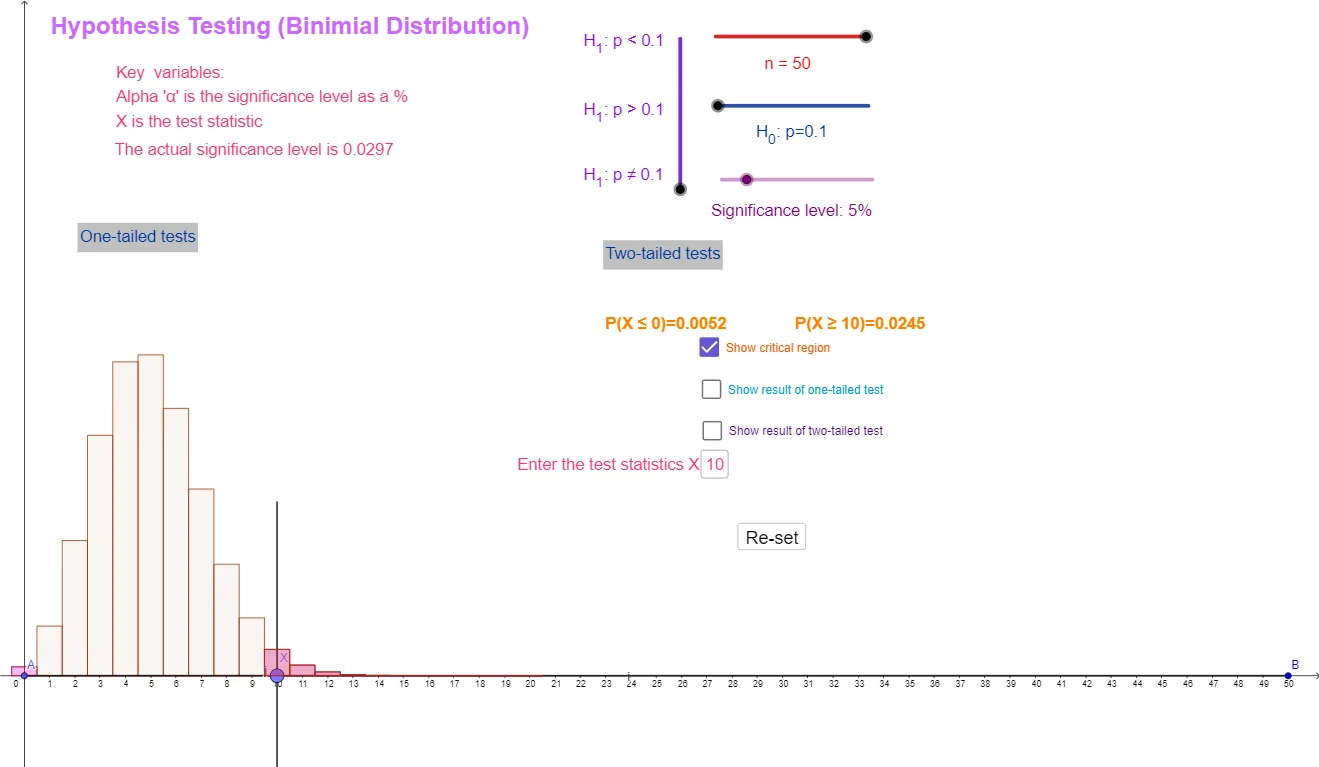
This example demonstrates the process and visualization of hypothesis testing for the binomial distribution. Key math concepts include hypothesis testing, binomial distribution, probability calculation, and statistical inference. GeoGebra commands and objects used in construction are Sequence, Element, If, Segment, BarChart, and Textfield. Suitable for high school and above learners to understand statistical inference methods and applications of the binomial distribution.
GeoGebra Commands & Parameters
Sequence(((nCr[n, r] * p_{1}^(r)) * (1 - p_{1})^(n - r)), r, 0, n, 1) → L, {0.00515377520732012, 0.02863208448511178, 0.07794289665391539, 0.13856514960696073, 0.18090450087575427, 0.1849246008952155, 0.15410383407934625, 0.10762807459509896, 0.06427787788318409, 0.03332927001350287, 0.015183334117262418, 0.006134680451419159, 0.002215301274123585, 0.000719499559117062, 0.00021128161656612139, 0.00005634176441763237, 0.000013694178851507866, 0.000003043150855890637, 6.199011002740187E-7, 1.1600488426180469E-7, 1.9978618956199695E-8, 3.1712093581269354E-9, 4.6447005750344014E-10, 6.282686768162475E-11, 7.853358460203094E-12, 9.074991998456909E-13, 9.695504271855672E-14, 9.575806688252515E-15, 8.739823564674916E-16, 7.366901088998014E-17, 5.729811958109566E-18, 4.1073920846663556E-19, 2.7097378336340542E-20, 1.6422653537176085E-21, 9.123696409542271E-23, 4.634258493735757E-24, 2.1454900433961835E-25, 9.020078260524496E-27, 3.428684718912821E-28, 1.172199903901819E-29, 3.5817219285888915E-31, 9.706563492110817E-33, 2.311086545740671E-34, 4.777439887836013E-36, 8.444969498700021E-38, 1.2511065924000032E-39, 1.5109983000000041E-41, 1.428840000000004E-43, 9.922500000000027E-46, 4.5000000000000126E-48, 1.0000000000000027E-50}Sequence(Sum[L, i], i, 1, n + 1, 1) → UElement(U, c_1 + 1) → s_1If(c_1 < 0, 0, s_1) → s_5Segment(A, B) → iBarChart(-0.5, c_3 + 0.5, Take[L, 1, c_3 + 1]) → fBarChart(-0.5, n + 0.5, L) → aSegment((x(X), 0.1), (x(X), -0.1)) → jBarChart(-0.5, c_1 + 0.5, Take[L, 1, c_1 + 1]) → cBarChart(c_2 - 0.5, n + 0.5, Take[L, c_2 + 1, n + 1]) → dBarChart(c_4 - 0.5, n + 0.5, Take[L, c_4 + 1, n + 1]) → gBarChart(-0.5, x(X) + 0.5, Take[L, 1, x(X) + 1]) → kElement(U, x(X) + 1) → x_1BarChart(x(X) - 0.5, n + 0.5, Take[L, x(X) + 1, n + 1]) → lElement(U, c_3 + 1) → s_3If(c_1 < 0, 0, c_1) → eIf(c_1 < 0, 0, c_1) → mIf(c_1 < 0, 0, c_1) → c_5Textfield(X) → InputBox1
AI Drawing Prompt Reference
Create a visualization of binomial hypothesis testing. First generate binomial probabilities from 0 to n using the specified parameter p, and compute a cumulative sum from that sequence. From the cumulative array, select individual elements and apply a nonnegative cutoff. Display the results as bar charts: show an overall bar chart for the full set of probabilities, then add additional bar-chart groups over specific index ranges determined by threshold positions, highlighting the regions used in the hypothesis test. Draw short vertical segments at the key split points on the horizontal axis and include a text input field for the chosen x/threshold.
The prompt above was compiled from the original drawing commands and is for reference only.