
Visualizing the Bivariate Normal Distribution with Correlation
Loading the math board and drawing, please wait…
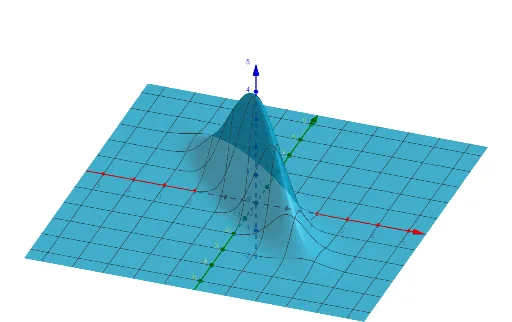
This example visualizes the joint behavior of a bivariate normal distribution on the 2D plane, showing how the density’s shape (typically represented by level curves/elliptical contours) changes with the mean vector, the marginal standard deviations, and the correlation coefficient. Key concepts include the parameters μx, μy, σx, σy and the correlation ρ, and how the joint density function f(x,y) determines the orientation and elongation of the contours. In GeoGebra, the construction is driven by the objects σx, σy, μx, μy, ρ, and the function f, where f encodes the bivariate normal density and its contours reflect the geometric impact of correlation and scale. Suitable for high school to early university learning in probability & statistics, for developing intuition about correlation, and for distribution visualization in mathematical modeling.
GeoGebra Commands & Parameters
Numeric σ_{x}(0.301)Numeric σ_{y}(0.301)Numeric μ_{x}(0)Numeric μ_{y}(0)Numeric ρ(-0.89)f(x, y) = (1 / (((((2 * π) * σ_{x}) * σ_{y}) * sqrt(1 - ρ^(2)))) * ℯ^((-((((x - μ_{x}) / σ_{x})^(2) - (((2 * ρ) * (x - μ_{x}) / σ_{x}) * (y - μ_{y}) / σ_{y}) + ((y - μ_{y}) / σ_{y})^(2)) / ((2 * (1 -
AI Drawing Prompt Reference
Draw a bivariate normal distribution showing the joint behavior with mean μx and μy set to 0, standard deviations σx and σy set to 0.301, and correlation coefficient ρ set to -0.89. First, set the values of σx and σy, then set the values of μx and μy, followed by setting the value of ρ, and finally plot the contours of the bivariate normal distribution based on these parameters.
The prompt above was compiled from the original drawing commands and is for reference only.