
Non-Parallel Lines Construction
Loading the math board and drawing, please wait…
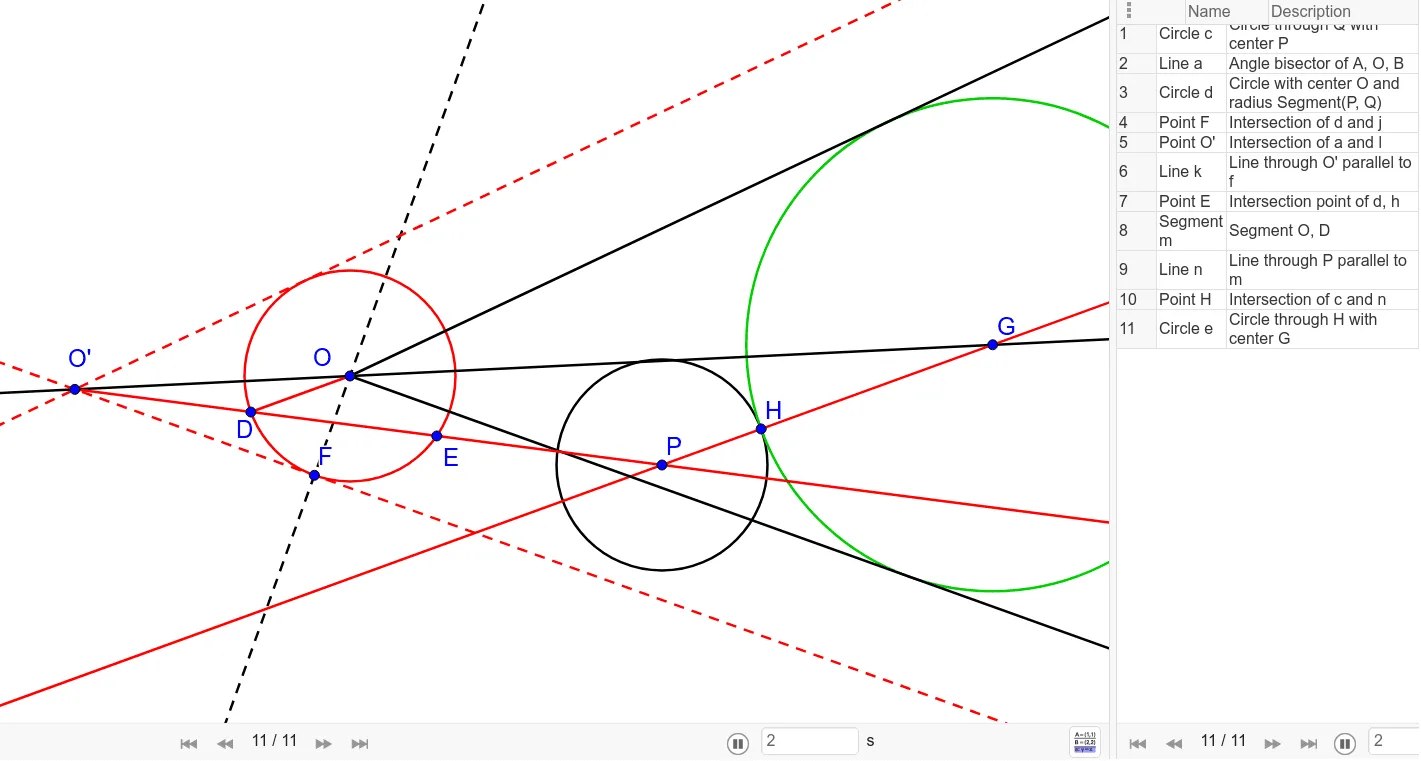
This example demonstrates how to construct non-parallel lines using GeoGebra. Key mathematical concepts include lines, rays, and angle construction. Using commands like Ray, Circle, AngularBisector, etc., non-parallel lines and related geometric elements are constructed. Suitable for students at the junior high school level and above for learning coordinate geometry and geometric construction.
GeoGebra Commands & Parameters
Ray(O, B) → fRay(O, A) → gCircle(P, Q) → cAngularBisector(A, O, B) → aCircle(O, Segment[P, Q]) → dOrthogonalLine(O, g) → jIntersect(d, j, 1) → FLine(F, g) → lIntersect(a, l) → O'Line(O', f) → kRay(O', P) → hIntersect(d, h) → D, ESegment(O, D) → mLine(P, m) → nIntersect(a, n) → GIntersect(c, n, 1) → HCircle(G, H) → e
AI Drawing Prompt Reference
Draw two non-parallel line segments from point O to A and B to form rays f and g. Construct a circle c with P and Q as centers, and the angle bisector a of angle AOB. Draw a circle d with PQ as the diameter, and a perpendicular line j to g, intersecting at point F which is the starting point of line l. Line l intersects a at O'. Draw a ray h from O' through P, intersecting d at points D and E. Connect OD to form segment m, and draw a line n through P and m. Line n intersects a at G and c at H. Draw a circle e with GH as the diameter.
The prompt above was compiled from the original drawing commands and is for reference only.