
New Decagon Construction
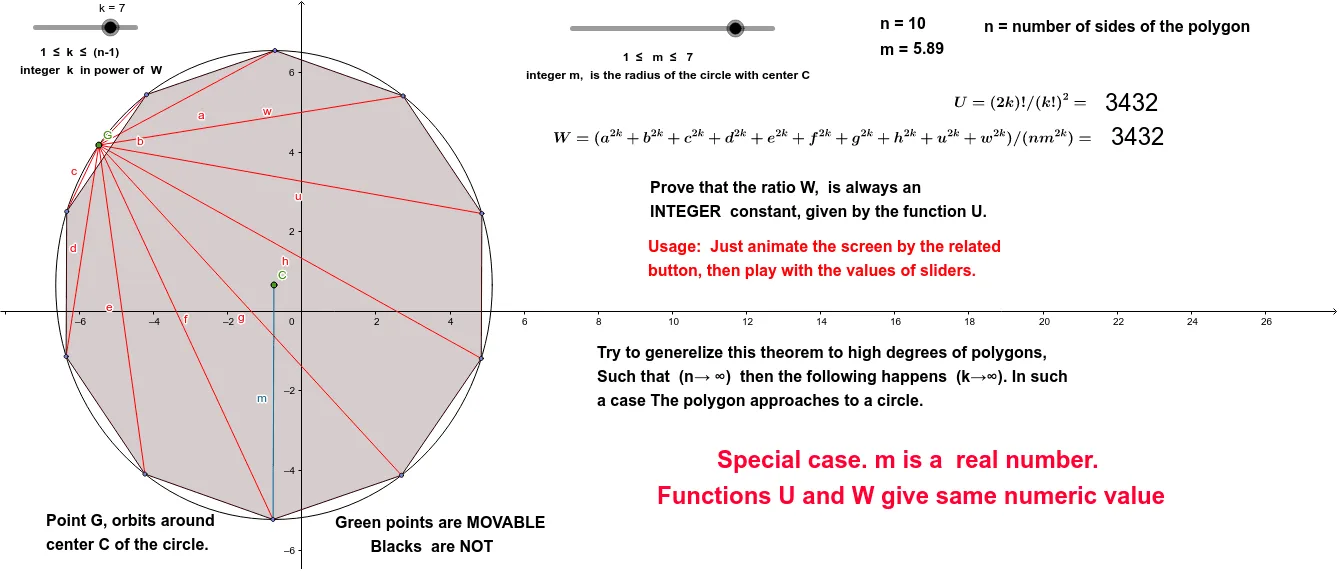
Loading the math board and drawing, please wait…
This example demonstrates how to create a decagon with two additional points using rotations and geometric constructions. It involves core concepts like geometric transformations, rotations, polygon construction, and special points. The construction uses commands such as Circle, Point, Segment, Rotate, AttachCopyToView, and Polygon in GeoGebra. Suitable for high school mathematics education to illustrate geometric transformations and complex polygon constructions.
GeoGebra Commands & Parameters
Circle(C, m_0) → g_1Point(g_1) → GPoint(g_1) → DSegment(G, D) → fRotate(D, 36°, C) → D'Segment(G, D') → gRotate(D', 36°, C) → D''Segment(G, D'') → hRotate(D'', 36°, C) → D'''Segment(G, D''') → uRotate(D''', 36°, C) → ESegment(G, E) → wRotate(E, 36°, C) → E'Segment(G, E') → aRotate(E', 36°, C) → E''Segment(G, E'') → bRotate(E'', 36°, C) → E'''Segment(G, E''') → cRotate(E''', 36°, C) → FSegment(G, F) → dRotate(F, 36°, C) → F'Segment(G, F') → eSegment(C, D) → mCircle(A, m_0) → hhhPoint(hhh) → BRotate(B, (-(60°)), A) → B'_1Rotate(B, 60°, A) → B'Rotate(B', 60°, A) → B''Rotate(B'', 60°, A) → B'''Rotate(B''', 60°, A) → KAttachCopyToView(PolyLine[(12.100000000000005,0.2599999999999979), (NaN,NaN), (12.100000000000005,0.2599999999999979), (12.080000000000004,0.19999999999999787), (12.020000000000005,0.2199999999999979), (12.020000000000005,0.29999999999999793), (12.020000000000005,0.379999999999998), (12.020000000000005,0.4599999999999981), (12.080000000000004,0.41999999999999804), (12.140000000000004,0.359999999999998), (12.160000000000004,0.29999999999999793), (12.160000000000004,0.2199999999999979), (12.140000000000004,0.15999999999999784), (12.060000000000004,0.15999999999999784), (12.000000000000004,0.17999999999999786), (11.960000000000004,0.2399999999999979), (11.960000000000004,0.31999999999999795), (11.960000000000004,0.399999999999998), (12.040000000000004,0.399999999999998), (12.140000000000004,0.399999999999998), (12.220000000000004,0.399999999999998), (12.260000000000005,0.33999999999999797), (12.280000000000005,0.2599999999999979), (12.280000000000005,0.17999999999999786), (12.220000000000004,0.2599999999999979), (12.220000000000004,0.33999999999999797), (12.200000000000005,0.4599999999999981), (12.160000000000004,0.5399999999999981), (12.120000000000005,0.5999999999999982), (12.040000000000004,0.5999999999999982), (11.960000000000004,0.5799999999999982), (11.880000000000004,0.5999999999999982), (11.880000000000004,0.6799999999999982), (11.800000000000004,0.7399999999999982), (11.880000000000004,0.6799999999999982), (11.920000000000005,0.6199999999999982), (11.940000000000005,0.5599999999999982), (12.040000000000004,0.5399999999999981), (12.160000000000004,0.49999999999999806), (12.220000000000004,0.4599999999999981), (12.180000000000005,0.399999999999998), (12.140000000000004,0.33999999999999797), (12.180000000000005,0.399999999999998), (12.240000000000004,0.41999999999999804), (12.280000000000005,0.33999999999999797), (12.280000000000005,0.2599999999999979), (12.320000000000004,0.15999999999999784), (12.340000000000005,0.2199999999999979), (12.260000000000005,0.2199999999999979), (12.180000000000005,0.2199999999999979), (12.100000000000005,0.19999999999999787), (12.000000000000004,0.19999999999999787), (11.900000000000004,0.19999999999999787), (11.860000000000005,0.2599999999999979), (11.840000000000005,0.31999999999999795), (11.800000000000004,0.379999999999998), (11.880000000000004,0.379999999999998), (11.940000000000005,0.33999999999999797), (12.000000000000004,0.29999999999999793), (12.060000000000004,0.359999999999998), (12.040000000000004,0.2799999999999979), (NaN,NaN), (7.460000000000003,-1.7000000000000035), true], 1, (-5.120000000000001, -5.000000000000006), (18.720000000000006, 6.620000000000003), (0, 581), (1192, 0)) → stroke1Segment(C, D') → h_1Segment(C, D'') → iSegment(C, D''') → jSegment(C, E) → lSegment(C, E') → pSegment(C, E'') → qSegment(C, E''') → rSegment(C, F) → sSegment(F', C) → tPolygon(E', E'', E''', F, F', D, D', D'', D''', E) → poly1, e', e_2, e'', e''', f_2, f', d_1, d', d'', d'''Polygon(E', E'', E''', F, F', D, D', D'', D''', E) → poly2, e'_1, e_3, e''_1, e'''_1, f_3, f'_1, d_2, d'_1, d''_1, d'''_1
AI Drawing Prompt Reference
Draw a decagon by rotating line segments and connecting their endpoints. Start with a circle, pick points on the circle, and connect them to form line segments. Rotate each line segment by 36 degrees around the circle's center, connecting the new endpoints after each rotation, repeating this process ten times to complete the decagon. Add two more points and use rotations and connections to construct additional geometric figures, demonstrating geometric transformations and complex constructions.
The prompt above was compiled from the original drawing commands and is for reference only.