
Net of a Square Pyramid by Edward Knote
Loading the math board and drawing, please wait…
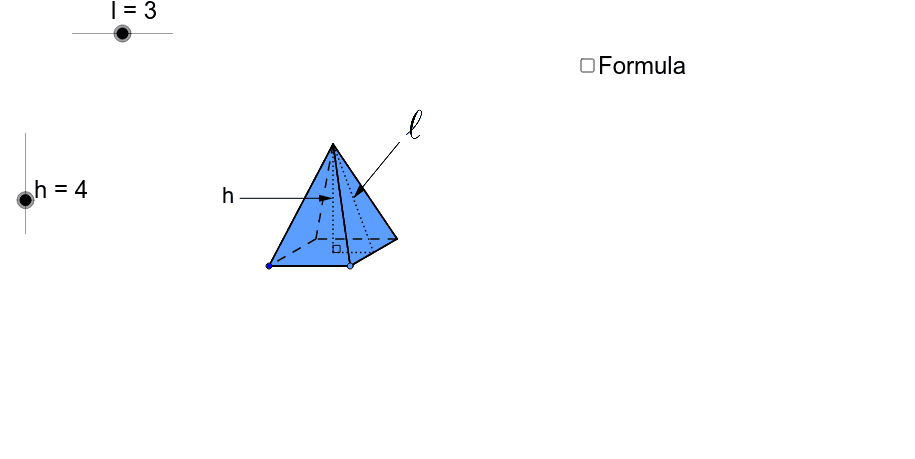
This example demonstrates the net of a square pyramid and its surface area formula. It involves core math concepts like polygons, solid geometry, and angle calculations. Constructed using GeoGebra commands such as Point, Segment, Rotate, Polygon, and Vector. Suitable for middle school and above students learning solid geometry and geometric construction.
GeoGebra Commands & Parameters
Point(Circle[A, l]) → BSegment(A, B) → aLine(A, B) → b_2Circle(B, 3 * l / 4.5) → cIntersect(c, b_2, 2) → CRotate(C, 30*°, B) → C'Line(C', b_2) → dSegment(B, C') → eLine(A, e) → fIntersect(d, f) → DPolygon(A, B, C', D) → poly1, a_1, b_1, c', d_1Segment(A, C') → gSegment(D, B) → h_1Intersect(g, h_1) → EOrthogonalLine(E, a_1) → iCircle(E, h) → kIntersect(k, i, 2) → FSegment(B, F) → jSegment(C', F) → l_5Segment(F, D) → mSegment(F, A) → nSegment(E, F) → pSegment(A, D) → qMidpoint(b_1) → GSegment(G, F) → rAngle(G, E, F) → αSegment(E, G) → tLine(E, G) → c_1Circle(G, F) → f_1Intersect(f_1, c_1, 2) → HIntersect(c_1, d_1) → ICircle(I, F) → g_1Intersect(g_1, c_1, 1) → JVector(F, J) → uPoint(c') → LCircle(L, F) → q_1Vector(F, H) → wMidpoint(A, B) → KLine(K, E) → e_1Circle(K, h) → p_1Intersect(e_1, c') → MCircle(M, h) → r_1Intersect(r_1, e_1, 2) → NIntersect(p_1, e_1, 1) → OVector(F, N) → vVector(F, O) → zTranslate(F, Vector[z * o]) → F'_1Translate(F, Vector[u * (o - 1)]) → F'_2Translate(F, Vector[v * (o - 2)]) → F'_3Translate(F, Vector[w * (o - 3)]) → F'Segment(F, N) → sLineBisector(s) → a_2Intersect(a_2, c') → PCircleArc(P, N, F) → c_2Ray(P, F'_3) → d_2Intersect(c_2, d_2, 1) → QSegment(F, O) → e_2LineBisector(e_2) → f_2Intersect(f_2, a_1) → RCircleArc(R, F, O) → g_2Ray(R, F'_1) → h_2Intersect(g_2, h_2, 1) → SCircleArc(I, F, J) → k_2CircleArc(G, H, F) → p_2Ray(I, F'_2) → i_2Intersect(k_2, i_2, 1) → TRay(G, F') → j_2Intersect(p_2, j_2, 1) → UCircle(I, E) → s_1OrthogonalLine(I, a_1) → i_1Intersect(s_1, i_1, 2) → VIntersect(s_1, i_1, 1) → WOrthogonalLine(V, i_1) → j_1OrthogonalLine(W, i_1) → k_1OrthogonalLine(G, k_1) → l_1Intersect(j_1, l_1) → ZIntersect(k_1, l_1) → A_1Midpoint(V, Z) → B_1Midpoint(A_1, W) → C_1Circle(B_1, r) → t_1Circle(C_1, r) → q_2OrthogonalLine(B_1, k_1) → m_1Intersect(t_1, m_1, 1) → D_1Intersect(q_2, m_1, 2) → E_1Vector(C', Z) → u_1Vector(B, A_1) → v_1Vector(N, D_1) → w_1Vector(O, E_1) → z_1Translate(N, Vector[w_1 * (o - 4)]) → N'Translate(O, Vector[z_1 * (o - 4)]) → O'Translate(B, Vector[v_1 * (o - 4)]) → B'Translate(A, Vector[v_1 * (o - 4)]) → A'Translate(C', Vector[u_1 * (o - 4)]) → C''Translate(D, Vector[u_1 * (o - 4)]) → D'If(o < 1, S, If[o < 4, O, If[o < 5, O', E_1]]) → F_1If(o < 1, F, If[o < 2, T, J]) → G_1If(o < 3, F, If[o < 4, U, H]) → H_1If(o < 2, F, If[o < 3, Q, If[o < 4, N, If[o < 5, N', D_1]]]) → I_1If(o < 4, A, If[o < 5, A', W]) → J_1If(o < 4, B, If[o < 5, B', A_1]) → K_1If(o < 4, C', If[o < 5, C'', Z]) → L_1If(o < 4, D, If[o < 5, D', V]) → M_1Polygon(F_1, J_1, K_1) → poly2, k_3, f_3, j_3Polygon(L_1, H_1, K_1) → poly3, k_4, l_2, h_3Polygon(L_1, I_1, M_1) → poly4, m_2, l_3, i_3Polygon(M_1, G_1, J_1) → poly5, j_4, m_3, g_3Intersect(m, j_3) → N_1Segment(I_1, N_1) → n_1Intersect(j_3, i_3) → O_1Intersect(c', i_3) → Q_1Intersect(c', i_3) → R_1Intersect(c', i_3) → S_1Intersect(c', i_3) → U_1Intersect(c', i_3) → A_2Intersect(l_2, i_3) → B_2Segment(B_2, O_1) → n_2Segment(B_2, M_1) → r_2Midpoint(M_1, L_1) → C_2Midpoint(L_1, K_1) → D_2Midpoint(K_1, J_1) → E_2Midpoint(J_1, M_1) → F_2Segment(G_1, F_2) → s_2Segment(C_2, I_1) → t_2Segment(D_2, H_1) → a_3Segment(E_2, F_1) → b_3Polygon(J_1, M_1, L_1, K_1) → poly6, j_5, m_4, l_4, k_5Intersect(j_3, d_1) → P_1Segment(P_1, M_1) → c_3Midpoint(p) → V_1OrthogonalLine(V_1, p) → d_3Point(d_3) → W_1Vector(W_1, V_1) → u_2Midpoint(r) → T_1Midpoint(a_3) → Z_1Point(a_2) → G_2Vector(G_2, T_1) → v_2Vector(G_2, Z_1) → w_2Point(Circle[H_2, l]) → I_2Segment(H_2, I_2) → e_3Line(H_2, I_2) → bCircle(I_2, 3 * l / 4.5) → p_3Intersect(p_3, b, 2) → J_2Rotate(J_2, 30*°, I_2) → K_2Segment(I_2, K_2) → n_3Line(K_2, b) → q_3Line(H_2, n_3) → r_3Intersect(q_3, r_3) → L_2Segment(H_2, K_2) → s_3Segment(I_2, L_2) → t_3Intersect(s_3, t_3) → M_2Circle(M_2, h) → c_4OrthogonalLine(M_2, b) → a_4Intersect(c_4, a_4, 2) → N_2Polygon(H_2, N_2, I_2) → poly7, i_4, h_4, n_4Polygon(I_2, N_2, K_2) → poly8, k_6, i_5, n_5Polygon(H_2, L_2, K_2, I_2) → poly9, h_5, l_6, k_7, i_6Polygon(H_2, N_2, L_2) → poly10, l_7, h_6, n_6Polygon(L_2, N_2, K_2) → poly11, k_8, l_8, n_7Midpoint(k_7) → O_2Segment(M_2, O_2) → b_4Segment(M_2, N_2) → d_4Segment(N_2, O_2) → e_4Angle(O_2, M_2, N_2) → βMidpoint(N_2, M_2) → P_2Midpoint(O_2, N_2) → Q_2Line(P_2, Q_2) → f_4Circle(P_2, l) → g_4Intersect(g_4, f_4, 1) → R_2Intersect(g_4, f_4, 2) → S_2Vector(R_2, P_2) → z_2Vector(S_2, Q_2) → u_3Midpoint(b_3) → V_2
AI Drawing Prompt Reference
Draw the net of a square pyramid, showing its surface area formula. Start with a square base, then rotate one of its sides to draw four isosceles triangles, maintaining the correct angle and proportion for the sides. Connect all shapes to form the net, highlighting the relationship between the base and the triangular faces.
The prompt above was compiled from the original drawing commands and is for reference only.