
Net of a Rectangular Prism
Loading the math board and drawing, please wait…
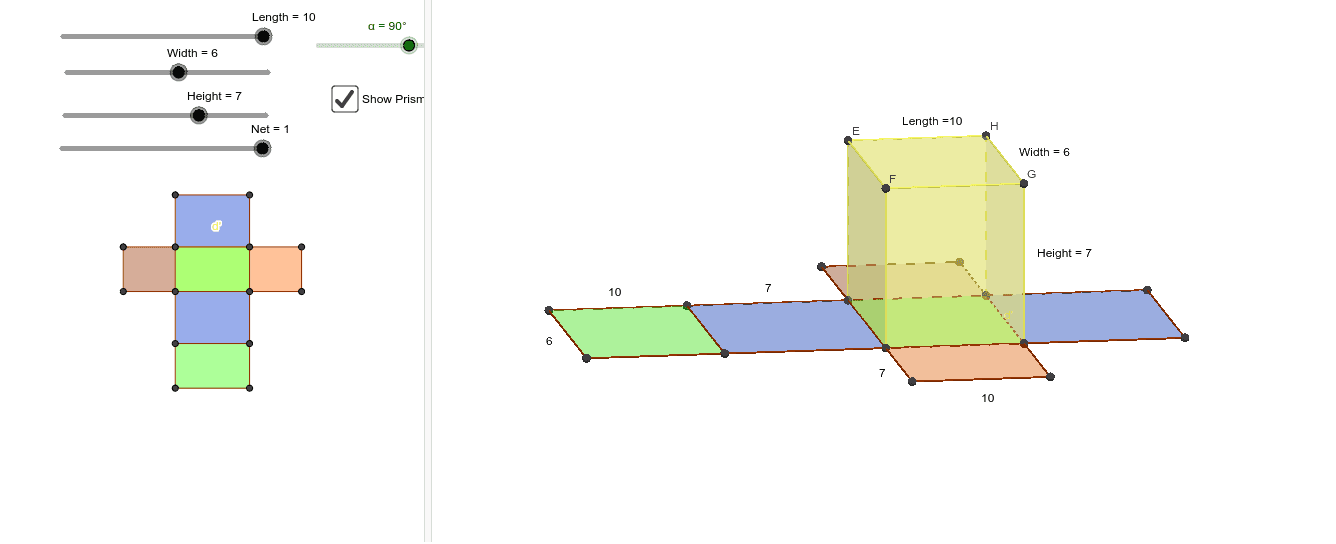
This example demonstrates the net of a rectangular prism. It involves the geometric construction of a rectangular prism and shows how to transform it into a plane figure through rotation and translation. Commands used include Point, Segment, Rotate, Polygon, Prism, Net, and Midpoint. Suitable for middle school and above students learning solid geometry.
GeoGebra Commands & Parameters
Point(Circle[A, Length]) → BSegment(A, B) → aPoint(Circle[A, Width]) → CSegment(A, C) → bRotate(A, α, A) → A'Rotate(C, α, A) → C'Segment(A', C') → b'Point(Circle[B, Width]) → DSegment(B, D) → cRotate(B, α, B) → B'Rotate(D, α, B) → D'Segment(B', D') → c'Segment(C', D') → dPolygon(A, B, D', C') → poly1, a_1, b_1, d', c'_1Prism(poly1, Height) → e, E, edgeAE, edgeBF, edgeD'G, edgeC'H, edgeEF, edgeFG, edgeGH, edgeEH, F, G, H, faceABFE, faceBD'GF, faceC'D'GH, faceAC'HE, faceEFGHNet(e, Net) → g, I, R, S, T, U, V, faceIJKL, faceIJNM, faceJKPO, faceKLRQ, faceILST, J, faceMNUV, edgeIJ, edgeJK, edgeKL, edgeIL, edgeIM, edgeMN, edgeJN, edgeJO, edgeOP, K, edgeKP, edgeKQ, edgeQR, edgeLR, edgeLS, edgeST, edgeIT, edgeNU, edgeUV, edgeMV, L, M, N, O, P, QMidpoint(edgeEH) → WMidpoint(edgeGH) → ZMidpoint(edgeD'G) → A_1Midpoint(edgeIM) → B_1Midpoint(edgeUV) → C_1Midpoint(edgeMV) → D_1Midpoint(edgeJO) → E_1Midpoint(edgeOP) → F_1