
Net of a Cube by Steve Phelps
Loading the math board and drawing, please wait…
In collections
Mensuration
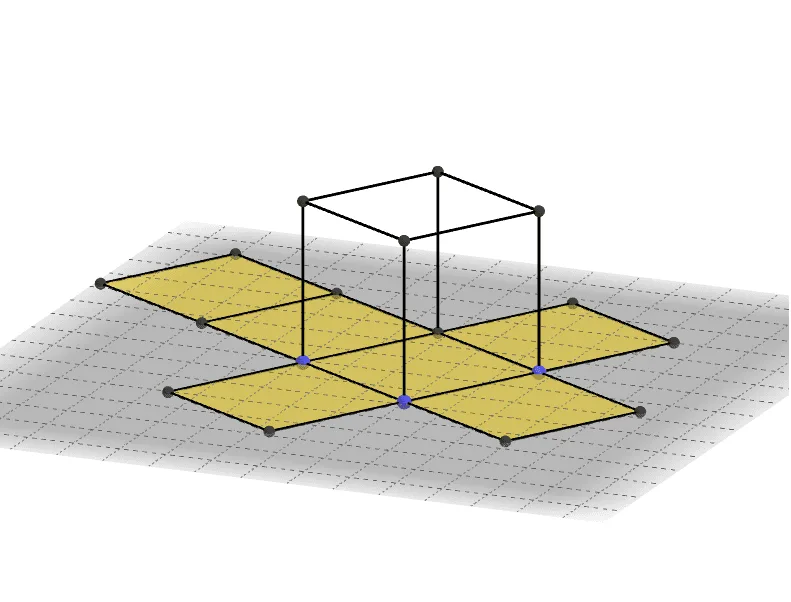
① This example demonstrates the construction of a cube's net, unfolding the six faces into a flat pattern to visualize the relationship between a 3D solid and its 2D representation. ② Core mathematical concepts include solid geometry (cube properties, faces, edges) and combinatorics (different net arrangements). ③ Construction details: Using GeoGebra commands Point, Cube, and Net, the example creates cube vertices A, B, C, D, E, F, G, H, six faces (faceABCD, faceADHE, faceABFE, faceBCGF, faceCDHG, faceEFGH), and edges (edgeAD, edgeAB, etc.), with auxiliary points I through S and parameters b, c to control the unfolding animation. ④ Suitable for middle school geometry and high school solid geometry, this interactive tool helps students understand spatial reasoning and explore the variety of cube nets.
GeoGebra Commands & Parameters
Point(Circle[B, Distance[A, B], Segment[A, B]]) → CCube(A, B, C) → a, D, faceCDHG, faceEFGH, edgeAD, edgeAB, edgeBC, edgeCD, edgeAE, edgeDH, edgeEH, edgeEF, E, edgeBF, edgeFG, edgeCG, edgeGH, F, G, H, faceABCD, faceADHE, faceABFE, faceBCGFNet(a, b) → c, I, R, S, T, U, V, faceIJKL, faceILNM, faceIJRQ, faceJKTS, faceKLVU, J, faceMNOP, edgeIL, edgeIJ, edgeJK, edgeKL, edgeLN, edgeMN, edgeIM, edgeIQ, edgeQR, K, edgeJR, edgeJS, edgeST, edgeKT, edgeKU, edgeUV, edgeLV, edgeNO, edgeOP, edgeMP, L, M, N, O, P, Q
AI Drawing Prompt Reference
Draw the net of a cube, showing how the six faces unfold into a flat pattern to visualize the relationship between a 3D solid and its 2D representation. Start by plotting the cube's vertices, then draw the six faces and all edges of the cube. Create auxiliary points and parameters to control the unfolding animation, and finally arrange the six faces in a flat pattern to form the cube's net.
The prompt above was compiled from the original drawing commands and is for reference only.