
Net of a Cube by Edward Knote
Loading the math board and drawing, please wait…
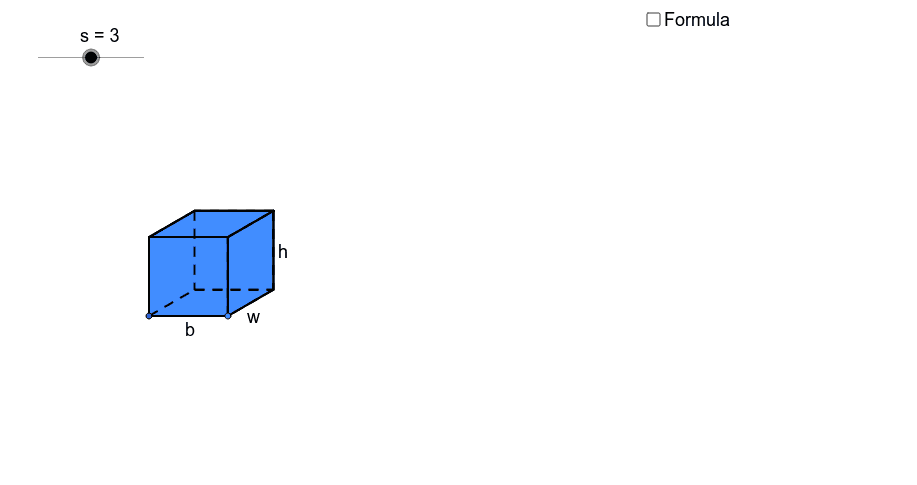
This applet demonstrates the net of a cube and its surface area formula. By dragging points, you can observe the changes in the net as the cube's dimensions change. Key mathematical concepts include solid geometry and surface area calculation. The construction uses GeoGebra commands such as point, segment, polygon, rotation, and translation. Suitable for middle school and above students learning solid geometry and surface area calculation.
GeoGebra Commands & Parameters
Point(Circle[A, s]) → BSegment(A, B) → aPolygon(A, B, 4) → poly1, a_1, b, c, d, C, DCircle(B, e) → fLine(A, B) → gIntersect(f, g, 2) → ERotate(E, 30*°, B) → E'OrthogonalLine(E', g) → hSegment(B, E') → iLine(C, i) → jIntersect(h, j) → FPolygon(E', F, 4) → poly2, e', f_1, k, l, G, HPolygon(A, H, G, D) → poly3, a_2, h_1, g_1, d_1Polygon(C, F, E', B) → poly4, c_1, f_2, e'_1, b_1Circle(B, A) → pCircle(A, B) → qIntersect(q, g, 2) → IIntersect(p, g, 2) → JCircle(J, B) → rIntersect(r, g, 2) → KLine(J, e'_1) → mLine(K, e'_1) → nLine(I, a_2) → tLine(H, E') → e_1Intersect(t, e_1) → LIntersect(m, e_1) → MIntersect(n, e_1) → NLine(B, E') → i_1Line(A, H) → j_1Intersect(f, i_1, 2) → OLine(O, g) → k_1Circle(E', B) → p_1Intersect(p_1, i_1, 2) → PLine(P, e_1) → l_1Intersect(j_1, l_1) → QLine(C, B) → m_1Circle(C, B) → q_1Intersect(q_1, m_1, 2) → RLine(R, c_1) → n_1Intersect(h, n_1) → SIntersect(j_1, k_1) → TCircleArc(C, R, D) → r_1CircleArc(B, K, R) → s_1CircleArc(E', N, S) → t_1CircleArc(E', M, F) → c_2CircleArc(B, J, C) → d_2CircleArc(A, B, I) → e_2CircleArc(H, G, L) → g_2CircleArc(F, S, G) → h_2Vector(F, P) → uVector(C, O) → vVector(D, R) → wVector(S, N) → u_1Vector(D, I) → v_1Translate(D, Vector[o * w]) → D'_1Ray(C, D'_1) → b_2Intersect(r_1, b_2, 1) → UTranslate(G, Vector[o * w]) → G'_1Ray(F, G'_1) → i_2Intersect(h_2, i_2, 1) → VLineBisector(F, P) → j_2Intersect(f, j_2, 2) → WCircleArc(W, P, F) → k_2Line(W, l_1) → l_2LineBisector(G, Q) → m_2Intersect(l_2, m_2) → ZCircleArc(Z, Q, G) → p_2Translate(C, Vector[(o - 1) * v]) → C'Translate(D, Vector[(o - 1) * v]) → D'_2If(o < 1, C, If[o < 2, C', O]) → A_1If(o < 1, D, If[o < 2, D'_2, T]) → B_1Translate(D, Vector[(o - 2) * v_1]) → D'Translate(G, Vector[(o - 2) * v_1]) → G'_2Ray(A, D') → n_2Ray(H, G'_2) → q_2Intersect(e_2, n_2, 1) → C_1Intersect(g_2, q_2) → D_1,If(o < 2, G, If[o < 3, D_1, L]) → E_1If(o < 2, D, If[o < 3, C_1, I]) → F_1Translate(G, Vector[(o - 3) * u]) → G'Translate(F, Vector[(o - 3) * u]) → F'Ray(H, G') → r_2Ray(E', F') → s_2Intersect(p_2, r_2, 1) → G_1Intersect(k_2, s_2, 1) → H_1If(o < 3, G, If[o < 4, G_1, Q]) → I_1If(o < 3, F, If[o < 4, H_1, P]) → J_1Translate(S, Vector[(o - 4) * u_1]) → S'Ray(E', S') → t_2Intersect(t_1, t_2, 1) → K_1Intersect(c_2, t_2, 1) → L_1Translate(R, Vector[(o - 4) * u_1]) → R'Ray(B, R') → a_3Intersect(s_1, a_3, 1) → M_1Intersect(d_2, a_3, 1) → N_1If(o < 1, U, If[o < 4, R, If[o < 5, M_1, K]]) → O_1If(o < 1, V, If[o < 4, S, If[o < 5, K_1, N]]) → P_1If(o < 4, C, If[o < 5, N_1, J]) → Q_1If(o < 4, F, If[o < 5, L_1, M]) → R_1Midpoint(B, E') → S_1Midpoint(A, H) → T_1Line(T_1, S_1) → c_3Circle(S_1, a / 2) → d_3OrthogonalLine(S_1, c_3) → g_3Intersect(d_3, g_3) → U_1, V_1Polygon(U_1, V_1, 4) → poly11, u_2, v_2, k_3, l_3, W_1, Z_1Polygon(Z_1, W_1, 4) → poly12, z_1, w_1, m_3, n_3, A_2, B_2Polygon(U_1, Z_1, 4) → poly13, u_3, z_2, s_3, t_3, C_2, D_2Polygon(W_1, V_1, 4) → poly14, w_2, v_3, c_4, d_4, E_2, F_2Polygon(V_1, U_1, 4) → poly15, v_4, u_4, e_4, f_4, G_2, H_2Polygon(H_2, G_2, 4) → poly16, h_6, g_4, i_4, j_4, I_2, J_2Segment(B, U_1) → m_4LineBisector(m_4) → n_4Vector(B, U_1) → zVector(T, C_2) → z_4Vector(L, A_2) → u_5Vector(P, E_2) → w_5Translate(I, Vector[z * (o - 5)]) → I'Translate(A, Vector[z * (o - 5)]) → A'Translate(B, Vector[z * (o - 5)]) → B'Translate(J, Vector[z * (o - 5)]) → J'Translate(K, Vector[z * (o - 5)]) → K'Translate(L, Vector[u_5 * (o - 5)]) → L'Translate(H, Vector[u_5 * (o - 5)]) → H'Translate(E', Vector[u_5 * (o - 5)]) → E''Translate(M, Vector[u_5 * (o - 5)]) → M'Translate(N, Vector[u_5 * (o - 5)]) → N'Translate(T, Vector[z_4 * (o - 5)]) → T'Translate(O, Vector[z_4 * (o - 5)]) → O'Translate(P, Vector[w_5 * (o - 5)]) → P'Translate(Q, Vector[w_5 * (o - 5)]) → Q'If(o < 5, O_1, If[o < 6, K', I_2]) → K_2If(o < 5, P_1, If[o < 6, N', J_2]) → L_2If(o < 5, Q_1, If[o < 6, J', G_2]) → M_2If(o < 5, R_1, If[o < 6, M', H_2]) → N_2If(o < 5, E', If[o < 6, E'', V_1]) → O_2If(o < 5, H, If[o < 6, H', W_1]) → P_2If(o < 5, E_1, If[o < 6, L', A_2]) → Q_2If(o < 5, J_1, If[o < 6, P', E_2]) → R_2If(o < 5, I_1, If[o < 6, Q', F_2]) → S_2If(o < 5, B, If[o < 6, B', U_1]) → T_2If(o < 5, A, If[o < 6, A', Z_1]) → U_2If(o < 5, A_1, If[o < 6, O', D_2]) → V_2If(o < 5, B_1, If[o < 6, T', C_2]) → W_2If(o < 5, F_1, If[o < 6, I', B_2]) → Z_2Polygon(Z_2, Q_2, P_2, U_2) → poly5, z_3, q_3, p_3, u_6Polygon(U_2, T_2, V_2, W_2) → poly6, u_7, t_4, v_5, w_3Polygon(U_2, P_2, O_2, T_2) → poly7, u_8, p_4, o_2, t_5Polygon(O_2, N_2, M_2, T_2) → poly8, o_1, n_5, m_5, t_6Polygon(N_2, L_2, K_2, M_2) → poly9, n_6, l_4, k_4, m_6Polygon(O_2, R_2, S_2, P_2) → poly10, o_3, r_3, s_4, p_5Intersect(k, v_5) → B_3Segment(G, B_3) → b_3Intersect(v_5, a_2) → A_3Segment(P_2, A_3) → e_3Intersect(t_4, p_5) → C_3Intersect(m_5, p_5) → D_3Segment(D_3, C_3) → f_3Segment(D_3, P_2) → h_3Point(Circle[E_3, s]) → F_3Segment(E_3, F_3) → j_3Line(E_3, F_3) → a_4Circle(F_3, e) → h_4Intersect(h_4, a_4, 2) → G_3Rotate(G_3, 30*°, F_3) → H_3Segment(F_3, H_3) → b_4Line(H_3, j_3) → q_4Line(E_3, b_4) → r_4Intersect(q_4, r_4) → I_3OrthogonalLine(H_3, q_4) → a_5OrthogonalLine(F_3, j_3) → b_5OrthogonalLine(E_3, a_4) → c_5OrthogonalLine(I_3, q_4) → d_5Circle(E_3, s) → e_5Intersect(e_5, c_5, 2) → J_3OrthogonalLine(J_3, c_5) → f_5Circle(I_3, s) → g_5Intersect(g_5, d_5, 2) → K_3OrthogonalLine(K_3, d_5) → h_5Intersect(a_5, h_5) → L_3Intersect(b_5, f_5) → M_3Polygon(J_3, M_3, L_3, K_3) → poly17, j_5, m_7, l_5, k_5Polygon(J_3, E_3, F_3, M_3) → poly18, j_6, e_6, f_6, m_8Polygon(F_3, M_3, L_3, H_3) → poly19, f_7, m_9, l_6, h_7Polygon(I_3, K_3, L_3, H_3) → poly20, i_5, k_6, l_7, h_8Polygon(E_3, J_3, K_3, I_3) → poly21, e_7, j_7, k_7, i_6Polygon(E_3, I_3, H_3, F_3) → poly22, e_8, i_7, h_9, f_8
AI Drawing Prompt Reference
Draw a cube's net with six square faces. Start by creating vertices A and B, then generate other vertices through rotation and translation. Use these vertices to construct the six square faces. Finally, connect the vertices and faces to form the edges of the net.
The prompt above was compiled from the original drawing commands and is for reference only.