
Nested Pentagons
Loading the math board and drawing, please wait…
In collections
Flip & turn
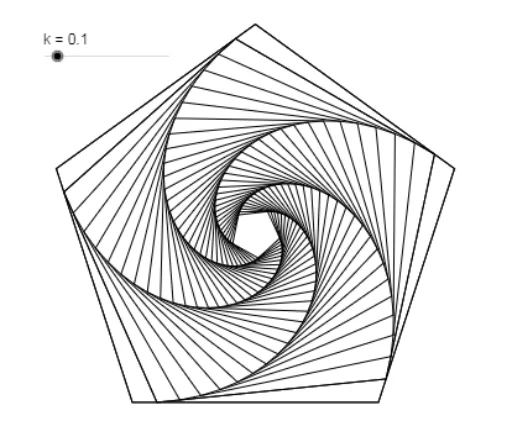
This example demonstrates the construction of nested pentagons. Key mathematical concepts include polygons and geometric construction. Using GeoGebra commands such as Intersect, Point, Polygon, and Circle, a series of nested pentagons can be constructed. Suitable for middle school and above students to learn polygon properties and geometric construction.
GeoGebra Commands & Parameters
Intersect(xAxis, yAxis) → APoint(xAxis) → BPolygon(A, B, 5) → poly1, a, b, c, d, e, C, D, ECircle(A, (a * k)) → fCircle(B, (a * k)) → gIntersect(f, a, 1) → FIntersect(g, b, 1) → GPolygon(F, G, 5) → poly2, h, i, j, l, m, H, I, Jnext(poly2, k) → poly3next(poly3, k) → poly4next(poly4, k) → poly5next(poly5, k) → poly6next(poly6, k) → poly7next(poly7, k) → poly8next(poly8, k) → poly9next(poly9, k) → poly10next(poly10, k) → poly11next(poly11, k) → poly12next(poly12, k) → poly13next(poly13, k) → poly14next(poly14, k) → poly15next(poly15, k) → poly16next(poly16, k) → poly17next(poly17, k) → poly18next(poly18, k) → poly19next(poly19, k) → poly20next(poly20, k) → poly21next(poly21, k) → poly22next(poly22, k) → poly23next(poly23, k) → poly24next(poly24, k) → poly25next(poly25, k) → poly26next(poly26, k) → poly27next(poly27, k) → poly28next(poly28, k) → poly29next(poly29, k) → poly30next(poly30, k) → poly31next(poly31, k) → poly32next(poly32, k) → poly33
AI Drawing Prompt Reference
Draw a series of nested pentagons starting from the origin, where each pentagon is tangent to the circumcircle of the previous one and scaled down proportionally, totaling 25 nested pentagons to illustrate a geometric progression from largest to smallest.
The prompt above was compiled from the original drawing commands and is for reference only.