
Cutting a Rectangle in Half
Loading the math board and drawing, please wait…
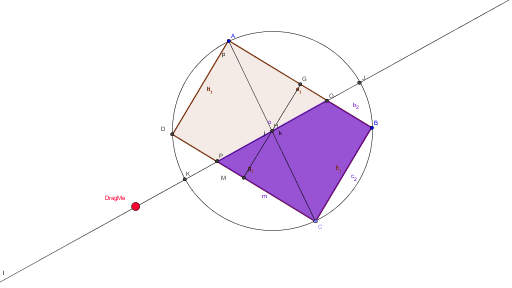
This example demonstrates how to geometrically construct a rectangle and cut it precisely in half, involving core math concepts such as geometric transformations, area calculation, reflection symmetry, and piecewise functions. Key construction points include using GeoGebra commands like Segment, OrthogonalLine, Point, Intersect, Polygon, Area, Midpoint, Circle, and Line to create objects like points A and B, polygons poly1 and poly2, enabling the drawing, splitting, and area verification of the rectangle. It is suitable for middle or high school geometry lessons to illustrate area, transformations, and function applications.
GeoGebra Commands & Parameters
Segment(A, B) → aOrthogonalLine(A, a) → bOrthogonalLine(B, a) → cPoint(c) → COrthogonalLine(C, b) → dIntersect(b, d) → DSegment(A, B) → eSegment(B, C) → fSegment(C, D) → gSegment(D, A) → hPolygon(A, B, C, D) → poly1, a_1, b_1, c_1, d_1Area(poly1) → iSegment(A, C) → jMidpoint(g) → FMidpoint(e) → GSegment(F, G) → kCircle(A, B, C) → pMidpoint(A, C) → HLine(H, DragMe) → lIntersect(p, l) → J, KIntersect(g, c_1) → LIntersect(l, g) → MIntersect(e, a_1) → NIntersect(l, poly1) → O, PPolygon(M, C, B, O) → poly2, m, c_2, b_2, o
AI Drawing Prompt Reference
Construct a rectangle by drawing a base segment, erecting perpendiculars at its endpoints, choosing a point on one perpendicular, and completing the rectangle with a parallel line through that point. Draw the diagonal connecting opposite vertices, then mark the midpoints of the two opposite sides and join them with a segment that bisects the rectangle. Draw the circle passing through three vertices of the rectangle, locate the midpoint of the diagonal, and draw a line through this midpoint and an arbitrary movable point. Mark the intersections of this line with the circle, with the opposite side of the rectangle, and with the interior of the rectangle. Finally, form a quadrilateral using the intersection on the opposite side, the two adjacent vertices of the rectangle, and one interior intersection point, illustrating a half‑rectangle region.
The prompt above was compiled from the original drawing commands and is for reference only.