
Cube Dissection Demo by Lingguo Bu
Loading the math board and drawing, please wait…
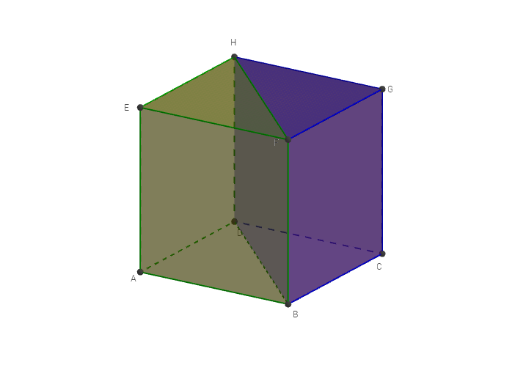
This example demonstrates the dissection of a cube into two geometric solids. Key math concepts include solid geometry, volume calculation, and geometric partitioning. GeoGebra commands and objects used are Intersect, Point, Cube, and Prism. Suitable for high school students and above learning solid geometry and volume calculations, or for math competition preparation.
GeoGebra Commands & Parameters
Intersect(zAxis, xOyPlane) → APoint(xAxis) → BPoint(Circle[B, Distance[A, B], Segment[A, B]]) → C_1Cube(A, B, C_1) → a, D, faceCDHG, faceEFGH, edgeAD, edgeAB, edgeBC, edgeCD, edgeAE, edgeDH_1, edgeEH_1, edgeEF_1, E, edgeBF, edgeFG_1, edgeCG, edgeGH_1, F, G, H, faceABCD, faceADHE, faceABFE, faceBCGFPrism(H, F, G, D) → b, I, edgeGH, edgeDH_2, edgeFI, edgeGJ, edgeDI, edgeIJ, edgeDJ, C, faceFGH, faceDHFI, faceFGJI, faceDHGJ, faceDIJ, edgeFH_1, edgeFGPrism(H, E, F, D) → c, K, edgeFH, edgeDH, edgeEK, edgeFL, edgeDK, edgeKL, edgeDL, L, faceEFH, faceDHEK, faceEFLK, faceDHFL, faceDKL, edgeEH, edgeEF
AI Drawing Prompt Reference
Draw a cube with its dissection into two geometric solids, starting by defining key points on the coordinate plane, then constructing the cube, and finally creating prisms to show how the cube is partitioned into two new shapes, highlighting the geometric relationships and volume changes.
The prompt above was compiled from the original drawing commands and is for reference only.