
Naming Angles According to Their Size
Loading the math board and drawing, please wait…
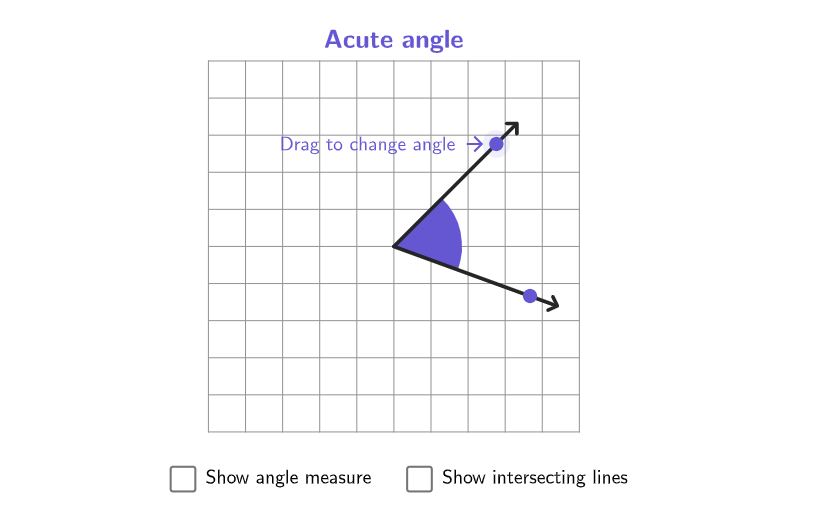
This example demonstrates how to use geometric vocabulary to describe the size of angles. It helps students identify and draw acute, right, obtuse, and straight angles. The construction involves GeoGebra commands like Sequence, Point, If, and Vector. Suitable for grades 4-5 to enhance mathematical understanding through interactive activities.
GeoGebra Commands & Parameters
Sequence(Rotate[(0, 2.5), K, Anchor], K, 0, (2 * pi), pi / 36) → rotationPointsPoint(rotationPoints) → P2PointToPixels(Corner[1], Corner[3], Corner[5], P2) → onboardingCoordsPoint(rotationPoints) → P1If(Angle[P2, Anchor, P1] ≤ pi, Angle[P2, Anchor, P1], Angle[P1, Anchor, P2]) → alphaVector(Anchor, P2) → vText(("" * alpha), LblPos, false, true, 0, 0) → lblAngleIf(alpha < pi / 2, {101 / 255, 87 / 255, 210 / 255}, If[alpha ≟ pi / 2, {218 / 255, 37 / 255, 112 / 255}, If[alpha ≟ pi, {58 / 255, 110 / 255, 214 / 255}, {15 / 255, 133 / 255, 56 / 255}]]) → colorAngleVector(Anchor, P1) → uSegment(Anchor, Anchor + (3 * UnitVector[u])) → arm1Segment(Anchor, Anchor + (3 * UnitVector[v])) → arm2onboardingTextOffset(Corner[onboardingText, 1], Corner[onboardingText, 3], onboardingCase, Corner[1], Corner[3], Corner[5]) → OnboardingTextOffsetcirclePixels(P2, 7 + (7 * pulsing), Corner[1], Corner[3], Corner[5]) → pulsingObjectPolygon({(-3.25, -3.25), (-3.25, 3.25), (3.25, 3.25), (3.25, -3.25)}) → viewboxText((("\text{" * If[alpha < pi / 2, "Acute", If[alpha ≟ pi / 2, "Right", If[alpha ≟ pi, "Straight", "Obtuse"]]]) * " angle}"), (0, 3.6), true, true, 0, 0) → textAngleType
AI Drawing Prompt Reference
On a coordinate-style diagram, draw two rays that share a single vertex, each passing through a point that changes position so the angle at the vertex varies through the full range from acute to right, obtuse, and straight. Show the angle with a clear angle marking. Next to the angle, add a label that updates to “Acute angle,” “Right angle,” “Obtuse angle,” or “Straight angle” according to the current angle size. Use a corresponding color for the angle label so the category is visually distinguishable as the rays rotate.
The prompt above was compiled from the original drawing commands and is for reference only.