
Naming Angle Positions with Transversal
Loading the math board and drawing, please wait…
In collections
Parallel Lines & Related Angles
Parallel Lines & Related Angles
Geometry: Parallel Lines & Related Angles
Year 7 (Angles)
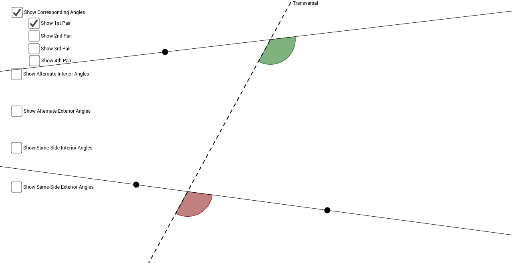
This GeoGebra applet demonstrates the various angle pair relationships formed when a transversal intersects two parallel lines, including corresponding angles, alternate interior angles, alternate exterior angles, and consecutive interior angles. The core mathematical concept is the positional relationships between angles in plane geometry. The construction uses GeoGebra commands including Line, Angle, Intersect, Point, and Circle to create the geometric figures, dynamically showing the eight angles formed by the transversal and the two intersected lines. The interactive feature allows students to drag points or the transversal to observe how angle measures and positions change, helping them deeply understand angle naming conventions. Suitable for middle school geometry teaching, particularly for 7th-grade parallel lines and angles curriculum.
GeoGebra Commands & Parameters
Line(A, B) → aLine(C, D) → bLine(E, F) → cAngle(c, b) → αIntersect(α, b, 1) → GIntersect(α, b, 1) → HIntersect(b, c) → IAngle(C, I, F) → βAngle(E, I, C) → γPoint(b) → JAngle(J, I, E) → δIntersect(a, c) → KAngle(B, K, I) → εAngle(I, K, A) → ζAngle(A, K, F) → ηAngle(F, K, B) → θCircle(I, 1) → c_1Circle(K, 1) → d_1Intersect(c_1, b, 2) → LIntersect(c_1, c, 1) → MIntersect(c_1, b, 1) → NIntersect(c_1, c, 2) → OIntersect(d_1, a, 2) → PIntersect(d_1, c, 1) → QIntersect(d_1, a, 1) → RIntersect(d_1, c, 2) → SCircleSector(I, L, M) → e_1CircleSector(I, M, N) → f_1CircleSector(I, N, O) → g_1CircleSector(I, O, L) → h_1CircleSector(K, P, Q) → k_1CircleSector(K, Q, R) → p_1CircleSector(K, R, S) → q_1CircleSector(K, S, P) → r_1Circle(I, 1) → s_1Circle(K, 1) → t_1Intersect(s_1, b, 2) → TIntersect(s_1, c, 1) → UIntersect(s_1, b, 1) → VIntersect(s_1, c, 2) → WIntersect(t_1, a, 2) → ZIntersect(t_1, c, 1) → A_1Intersect(t_1, a, 1) → B_1Intersect(t_1, c, 2) → C_1CircleSector(I, T, U) → c_2CircleSector(I, U, V) → d_2CircleSector(I, V, W) → e_2CircleSector(I, W, T) → f_2CircleSector(K, Z, A_1) → g_2CircleSector(K, A_1, B_1) → h_2CircleSector(K, B_1, C_1) → k_2CircleSector(K, C_1, Z) → p_2
AI Drawing Prompt Reference
Draw two parallel lines and a transversal intersecting them to form eight angles. Label corresponding, alternate interior, and alternate exterior angles, highlighting consecutive interior angles. Use arcs to indicate adjacent angles. Allow dragging points or the transversal to show how angle measures and positions change, demonstrating angle relationships in plane geometry.
The prompt above was compiled from the original drawing commands and is for reference only.