
n=48 Polyhedron Computer Constructions
Loading the math board and drawing, please wait…
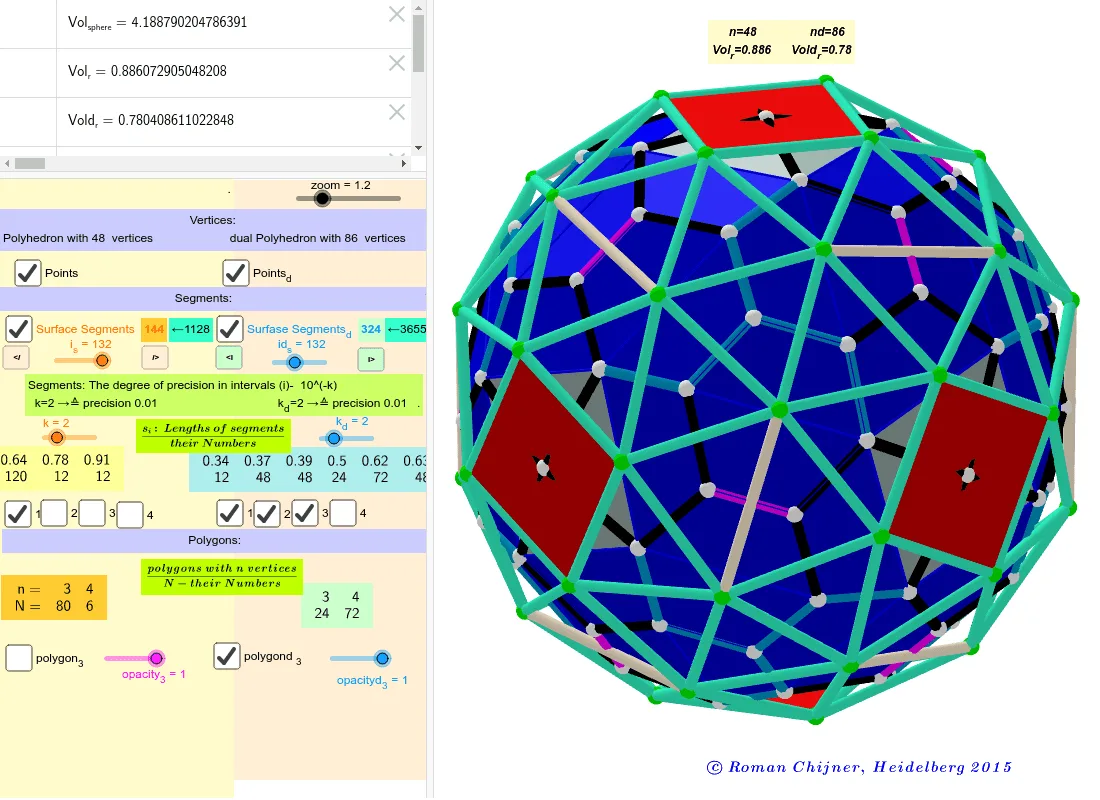
This example demonstrates the computer construction of a polyhedron with n=48, showcasing dynamic geometric methods for building complex shapes. Core math concepts include constructions, random variables, exponent, hypergeometric distribution, complex numbers, and exponential functions. Key GeoGebra commands and objects used, as per the construction summary, are Element, Sequence, Sort, TableText, A00, r0, Segments, etc. Suitable for high school and above learners to understand solid geometry constructions and probability statistics applications.
GeoGebra Commands & Parameters
Element(A00_1, 1) → A00Sequence(((zoom * Element[Element[A00, i], 1]), (zoom * Element[Element[A00, i], 2]), (zoom * Element[Element[A00, i], 3])), i, 1, Length[A00]) → A0Element(A00_1, 2) → A00dSort(Sequence[Segment[Element[A0, Element[Element[nom, i], 1]], Element[A0, Element[Element[nom, i], 2]]], i, 1, Length[nom]]) → SegmentsSequence(Element[Segments, i], i, 1, i_s) → Segments_oSort(Union[{}, ceil((Segments * 10^(k))) / 10^(k)]) → SegnSequence(KeepIf[If[i ≟ 1, x ≤ Element[Segn, i], If[i ≟ Length[Segn], Element[Segn, i - 1] < x, Element[Segn, i - 1] < x ≤ Element[Segn, i]]], Segments], i, 1, Length[Segn]) → la0Sequence(Length[Element[la0, i]], i, 1, Length[Segn]) → lLengthElement(la0, 1) → la1Element(la0, 2) → la2Element(la0, 3) → la3Element(la0, 4) → la4Sequence(((zoom * Element[Element[A00d, i], 1]), (zoom * Element[Element[A00d, i], 2]), (zoom * Element[Element[A00d, i], 3])), i, 1, Length[A00d]) → A0dSort(Sequence[Segment[Element[A0d, Element[Element[nomd, i], 1]], Element[A0d, Element[Element[nomd, i], 2]]], i, 1, Length[nomd]]) → SegmentsdSequence(Element[Segmentsd, i], i, 1, id_s) → Segmentsd_oSort(Union[{}, ceil((Segmentsd * 10^(k_d))) / 10^(k_d)]) → SegndSequence(KeepIf[If[i ≟ 1, x ≤ Element[Segnd, i], If[i ≟ Length[Segnd], Element[Segnd, i - 1] < x, Element[Segnd, i - 1] < x ≤ Element[Segnd, i]]], Segmentsd], i, 1, Length[Segnd]) → la0dSequence(Length[Element[la0d, i]], i, 1, Length[Segnd]) → lLengthdTableText({mm5ad, mm7ad}, "hr") → text2Element(la0d, 1) → la1dElement(la0d, 2) → la2dElement(la0d, 3) → la3dElement(la0d, 4) → la4dTableText({Segn, lLength}, "hr") → text8TableText({Segnd, lLengthd}, "hr") → text9Sequence(Polygon[Element[A0, Element[Element[mm1, f], 1]], Element[A0, Element[Element[mm1, f], 2]], Element[A0, Element[Element[mm1, f], 3]]], f, 1, Length[mm1]) → poly_3Sequence(Polygon[Element[A0d, Element[Element[mm1d, f], 1]], Element[A0d, Element[Element[mm1d, f], 2]], Element[A0d, Element[Element[mm1d, f], 3]]], f, 1, Length[mm1d]) → polyd_3TableText({Append["n=", mm5a], Append["N=", mm7a]}, "hr") → text1Sequence(Polygon[Element[A0, Element[Element[Element[mm6, 1], i], 1]], Element[A0, Element[Element[Element[mm6, 1], i], 2]], Element[A0, Element[Element[Element[mm6, 1], i], 3]], Element[A0, Element[Element[Element[mm6, 1], i], 4]]], i, 1, 6) → poly_{4}Sequence(Polygon[Element[A0d, Element[Element[Element[mm6d, 1], i], 1]], Element[A0d, Element[Element[Element[mm6d, 1], i], 2]], Element[A0d, Element[Element[Element[mm6d, 1], i], 3]], Element[A0d, Element[Element[Element[mm6d, 1], i], 4]]], i, 1, 72) → polyd_{4}
AI Drawing Prompt Reference
Draw a polyhedron with 48 vertices, consisting of two symmetric sets of points. Connect points within each set to form edges, then sort and group these edges by length. Count edges in each length interval. Use the edges to construct triangular and quadrilateral faces, forming the polyhedron's surface. Display two tables: one listing edge length groups with counts, and another showing the total number of vertices and edges. The final image shows a 3D solid with statistical data.
The prompt above was compiled from the original drawing commands and is for reference only.