
Multiplication Using Lever of Similar Triangle
Loading the math board and drawing, please wait…
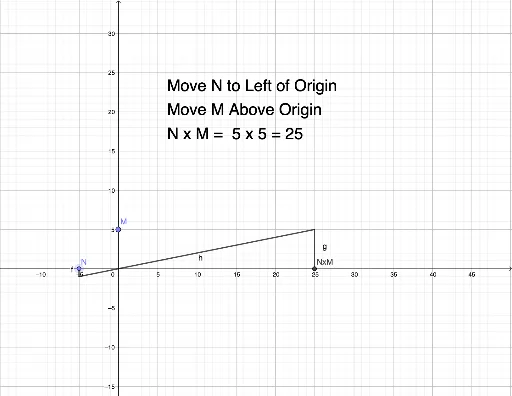
① This GeoGebra example demonstrates how to multiply two numbers using the geometric principle of a lever based on similar triangles, turning an arithmetic product into a visual ratio relationship. ② The core mathematical concept is the proportionality of corresponding sides in similar triangles, applied to construct a geometric multiplication model where segment lengths represent numbers. ③ Construction details: The example uses Point commands to create key points (N, n, M, m, etc.) and Segment commands to draw the lever-like triangle structure. Objects such as h, g, f, and nm help define the proportional relationships, while a text object (text1) displays the computed product. By dragging points, users can change the input numbers and observe the product update dynamically. ④ This is suitable for middle school and above students to explore the connection between geometry and arithmetic, and can serve as a hands-on activity for understanding similarity and proportional reasoning.
GeoGebra Commands & Parameters
Point(xAxis) → NPoint(yAxis) → MSegment(((-n), -1), ((n * m), m)) → hSegment(((n * m), 0), ((n * m), m)) → gSegment(((-n), 0), ((-n), -1)) → f
AI Drawing Prompt Reference
Draw a lever-like triangle with a horizontal base and a vertical vertex, using two similar small triangles to demonstrate the multiplication principle where one side represents the multiplicand and the other represents the multiplier, with the ability to dynamically display the product by dragging points to change values.
The prompt above was compiled from the original drawing commands and is for reference only.