
Multiplication of Fractions
Loading the math board and drawing, please wait…
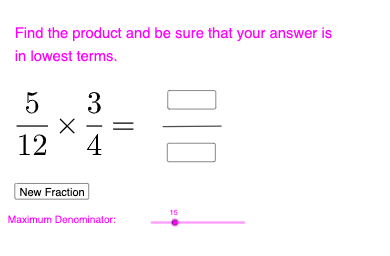
This example demonstrates the process of multiplying fractions. Key mathematical concepts include fractions and multiplication. Using commands like Random, Textfield, and Segment in GeoGebra, two fractions are created and their product is calculated. Suitable for high-grade elementary or junior high school students learning fraction multiplication.
GeoGebra Commands & Parameters
Random(4, d) → den2, 4Random(4, d) → den1, 12Random(1, den2 - 1) → num2, 3Random(1, den1 - 1) → num1, 5Textfield(useransnum) → InputBox1Textfield(useransden) → InputBox2Segment(A, B) → f
AI Drawing Prompt Reference
Draw two fraction bar diagrams on a shared baseline to illustrate multiplying fractions. First choose two random denominators to define how many equal parts each bar is divided into, then choose random numerators to indicate how many of those parts are shaded or highlighted for each fraction. Place two text input areas to enter the numerator and denominator values, and include a simple segment shape to frame each divided bar area for comparison. Convey the multiplication setup by indicating that the final fraction corresponds to the product of the two displayed fractions.
The prompt above was compiled from the original drawing commands and is for reference only.