
Multiplication Demonstration
Loading the math board and drawing, please wait…
In collections
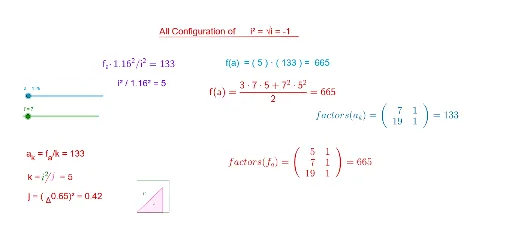
Complex Math
This example dynamically illustrates multiplication operations and their geometric relationships. It involves core math concepts like vectors, polygon constructions, integrals, and function graphs. GeoGebra commands and objects used include Point, Vector, Polygon, Segment, Line, Intersect, Integral, Textfield, and Factors. Suitable for high school mathematics teaching, helping students understand the integration of functions, integrals, and geometric constructions.
GeoGebra Commands & Parameters
Point(r) → CVector((0, 0), (1.16, a^(0.5))) → dPoint(d) → EVector((1.16, 0), (1.16, a^(0.5))) → cPoint(c) → FPolygon(D, E, F) → poly2, f_1, d_2, e_1Point(b) → APoint(w) → BPolygon(D, A, C, B) → poly1, d_1, a_1, c_1, b_1Segment(C, B) → gPoint(u) → GPoint(v) → HPolygon(D, H, G) → poly3, g_1, d_3, hLine(H, G) → lIntersect(p, l, (-1.4792041711822467, 0.22781892112178792)) → IIntersect(q_2, l, (0.22838, -1.4767443707086351)) → JSegment(I, J) → iVector(((t * a), 0)) → mPoint(n) → LVector((((3 * t) * a / 2), 0)) → sPoint(s) → KPolygon(D, K, L) → poly4, l_1, d_4, k_1Integral(q_2, 1, (a * 3)) → m_1Intersect(q, f, (5.923752436134908, 664.9999999636309)) → MIntegral(q, 1, 1.79) → r_1Textfield(a) → InputBox1Segment(N, O) → eFactors(f_a) → m1Factors(a_k) → m2Segment(P, Q) → j_1