
Multilevel Quiz: Combining Like Terms with Feedback
Loading the math board and drawing, please wait…
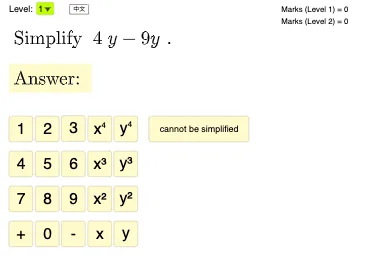
This interactive GeoGebra example generates randomized polynomial questions to demonstrate the full workflow of combining like terms: constructing expressions, expanding them, and then checking a student’s answer with immediate feedback. It focuses on core algebra concepts such as identifying like terms, adding coefficients, and simplifying polynomial expressions. The construction uses GeoGebra commands from the provided summary: Random and RandomElement to create varying problems, Join and SelectedIndex to assemble candidate term sets and track choices, Expand to expand expressions before simplification, and If to compare the student’s input (textInput/input2) against the expected result and trigger conditional responses. Objects such as levelList/level implement multilevel difficulty, buttonNext and buttonClear control quiz progression, picCorrect/picWrong provide correctness indicators, and marks1/marks2 record scores. It includes UI controls for answer entry and language switching (buttonLang/lang) to support classroom use. Suitable for middle and high school algebra lessons, practice homework, and differentiated instruction.
GeoGebra Commands & Parameters
Random(1, 4) → mJoin({{m, m, m, m, m, m, m, m, m}, {1, 2, 3, 4} \ {m}}) → list2RandomElement(list1) → aRandomElement(list1) → bSelectedIndex(levelList) → levelExpand(input) → input2RandomElement(list2) → nRandomElement({true, false}) → randomXYExpand(If[randomXY, f_1(x) + f_2(x), g_1(x, y) + g_2(x, y)]) → ansL1Random(1, 4) → rExpand(If[randomXY, h_1(x, y) + h_2(x, y), k_1(x, y) + k_2(x, y)]) → ansL2If(level ≟ 1, ansL1, ansL2) → ansIf(level ≟ 1, If[randomXY, textQ1a, textQ1b], If[randomXY, textQ2a, textQ2b]) → textQ
AI Drawing Prompt Reference
An interactive algebra quiz interface featuring randomly generated polynomial problems. The interface displays the problem text, with an answer input box for student responses. The system automatically expands expressions and compares them to the expected result, providing correct or incorrect feedback and recording scores. It includes difficulty selection and language switching controls for varying difficulty and language versions. The construction order is: first select difficulty level, then generate problem text, then present the problem and input box, and finally provide real-time feedback and update scores.
The prompt above was compiled from the original drawing commands and is for reference only.