
Montmort Problem (Matching Problem) Simulation and Probability Distribution
Loading the math board and drawing, please wait…
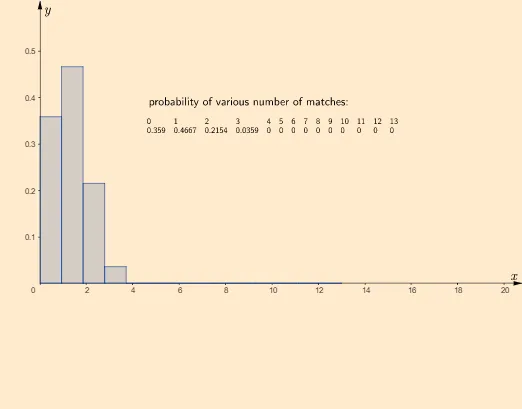
This GeoGebra example dynamically simulates the classic Montmort problem (also known as the matching problem), demonstrating how the probability that at least one element remains in its original position (a match) changes as n elements are randomly permuted. Core mathematical concepts include permutations, derangements, probability distributions, expected values, and the law of large numbers where empirical frequencies approach theoretical probabilities. The construction uses GeoGebra commands such as Sequence, Sample, Frequency, Classes, Histogram, TableText, and FrequencyTable to generate random samples and count matches. Interactive buttons (button1 to button4) control simulation runs and parameters, while a histogram displays the distribution of matching counts. The theoretical probability p0 is compared with the simulated probability pn. This resource is suitable for high school to undergraduate probability and statistics courses, and for exploring classic combinatorial paradoxes, helping students intuitively understand the relationship between empirical frequency and theoretical probability.
GeoGebra Commands & Parameters
Length(l1) → samplesizeSequence(0, n, 1) → variableClasses(variable, n + 1) → classesSequence(n) → envelopeSample(envelope, n, false) → letterFrequency(classes, l1, true, 1 / samplesize) → probSequence(If[Element[envelope, t] ≟ Element[letter, t], 1, 0], t, 1, n) → matchingElement(prob, 1) → p0TableText(envelope, letter, matching) → text3Sum(matching) → bTableText(variable, prob) → text8FrequencyTable(classes, l1) → l4Histogram(classes, prob) → c
AI Drawing Prompt Reference
Create a simulation of the Montmort problem with n elements, showing the probability change of at least one element staying in its original position. Use sequences to generate random samples, calculate the number of matches, and draw a histogram to display the distribution of matches. Compare the theoretical probability p0 with the simulated probability pn.
The prompt above was compiled from the original drawing commands and is for reference only.