
Moment Projection on an Axis in 3D
Loading the math board and drawing, please wait…
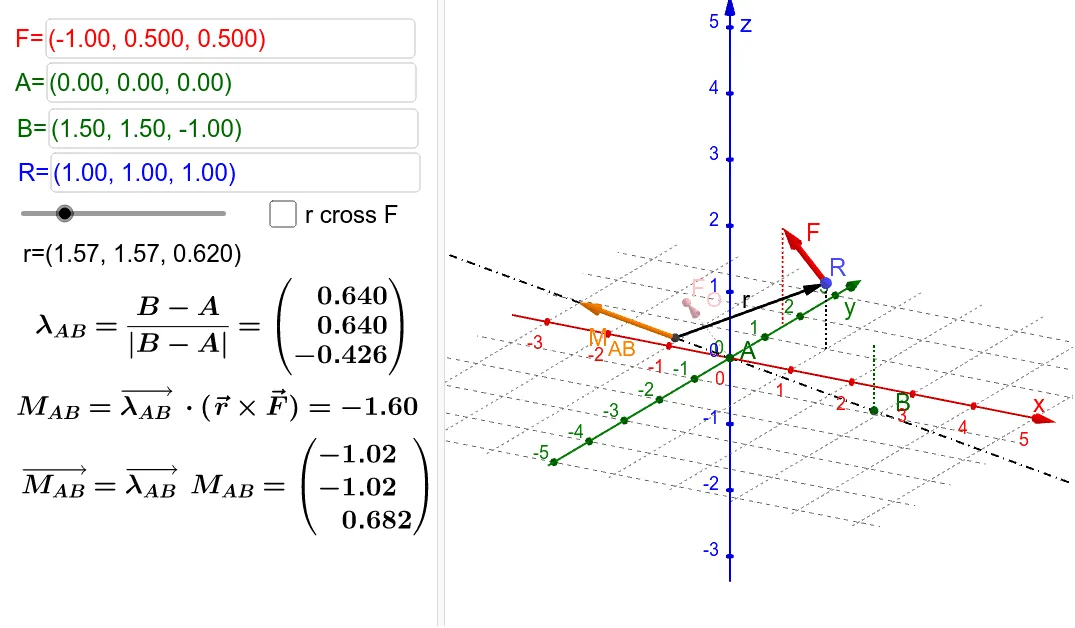
This example illustrates the projection of a moment onto an axis in three dimensions. Key mathematical concepts include vectors and 3D geometry. Using GeoGebra commands such as Vector, Length, Line, Segment, Textfield, and Angle, the projection can be constructed. Suitable for high school physics and mathematics education.
GeoGebra Commands & Parameters
Vector(Pnt, R) → rVector(R, F_1) → FVector(F_O) → fLength(F) → LFLine(B, A) → kVector(A, B) → axisLength(axis) → LaxisVector(Pnt, OL) → M_{OL}Length(r) → LrppSegment(Cxy, R) → lSegment(Fxy, F_1) → mTextfield(F_O) → InputBox1Textfield(A) → InputBox2Textfield(B) → InputBox3Textfield(R) → InputBox4Angle(OL, Pnt, RXF, xOyPlane) → αVector(Pnt, RXF) → rXFSegment(Bxy, B) → hSegment(Axy, A) → i
AI Drawing Prompt Reference
Illustrate the projection of a moment onto an axis in 3D space. Start by plotting points for the origin, force point, and reference point, then connect them to form vectors. Define an axis vector and compute the vector from the origin to the axis. Draw the force vector, calculate its length, and then the axis vector's length. Finally, mark the projection of the force onto the axis, labeling key angles and lengths to show the geometric construction of the vector projection.
The prompt above was compiled from the original drawing commands and is for reference only.