
Moiré Effect on a Sphere
Loading the math board and drawing, please wait…
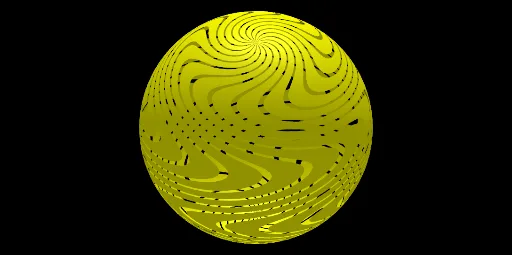
This example demonstrates the Moiré effect on a sphere. The Moiré effect is a visual phenomenon that occurs when two sets of almost parallel lines are overlaid with different spacing. In this case, concentric circles and spirals are drawn on the sphere to illustrate this effect. Key mathematical concepts include circles, spirals, and spherical geometry. The construction uses GeoGebra commands such as Sphere and Sequence.
GeoGebra Commands & Parameters
Sphere((0, 0), 1) → aSurface((cos(k) * cos(a + sin((5 * k)))), (cos(k) * sin(a + sin((5 * k)))), sin(k), k, ((-π)) / 2, π / 2, a, 0, (ep * π / n)) → C1Sequence(Rotate[C1, i, zAxis], i, 0, (2 * π), (2 * π / n)) → l1Surface((cos(k) * cos(a + sin((5 * k)))), sin(k), (cos(k) * sin(a + sin((5 * k)))), k, ((-π)) / 2, π / 2, a, 0, (ep * π / n)) → b
AI Drawing Prompt Reference
Draw concentric circles and spirals on a sphere to demonstrate the Moiré effect. Start by creating a unit sphere, then plot surfaces defined by parametric equations on its surface to form dense circular and spiral patterns. Rotate these patterns around the sphere's center to create overlapping Moiré patterns, resulting in a complex visual effect.
The prompt above was compiled from the original drawing commands and is for reference only.