
Module 19: Reflection and Rotate Object – GeoGebra Transformation Demo
Loading the math board and drawing, please wait…
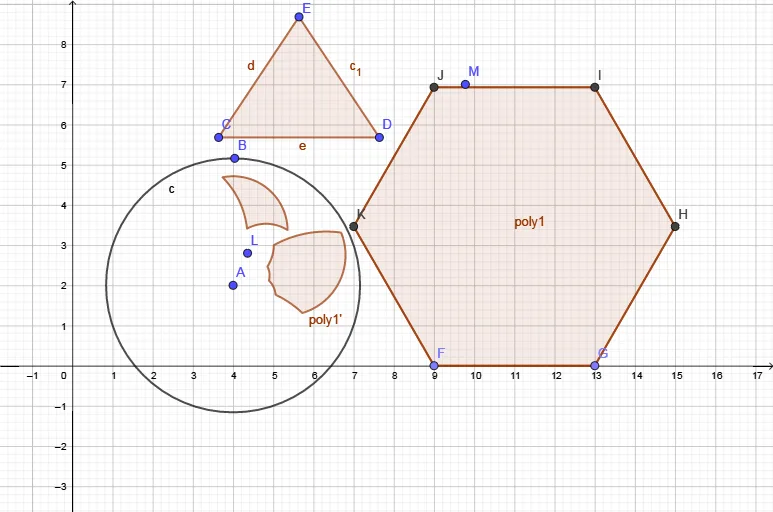
①This example demonstrates how to use reflection (Mirror) and rotation operations in GeoGebra to transform a polygon and observe the relationships between the original and transformed shapes, along with auxiliary circles and medians. ②Core mathematical concepts include reflection symmetry, rotation, circumscribed circles, centroid (barycenter), translation, and construction with integer coordinates, highlighting fundamental properties of plane figures under transformations. ③Construction highlights: Based on the summary, commands such as Circle, Polygon, Point, and Mirror are used, creating multiple points (A, B, C, D, E, etc.), polygon poly1 and its image poly1', auxiliary circles c and c_1, and lines f, g, h, etc. The mirror command generates the transformed object while preserving corresponding elements. ④Suitable for middle or high school geometry lessons or math lab activities, helping students intuitively grasp how reflection and rotation affect position and shape, and explore concepts like symmetry and centroid.
GeoGebra Commands & Parameters
Circle(A, B) → cPolygon(C, D, E) → t1, e, c_1, dPoint(xAxis) → FPoint(xAxis) → GPolygon(F, G, 6) → poly1, f, K, g, h, i, j, k, H, I, JMirror(poly1, c) → poly1'Mirror(t1, c) → t1'
AI Drawing Prompt Reference
Draw a hexagon and a circle around it. Then, reflect the hexagon and the triangle inside it across the circle to observe the relationship between the original and transformed shapes. Finally, add auxiliary lines and points to demonstrate how reflection and rotation affect the position and shape of the figure.
The prompt above was compiled from the original drawing commands and is for reference only.