
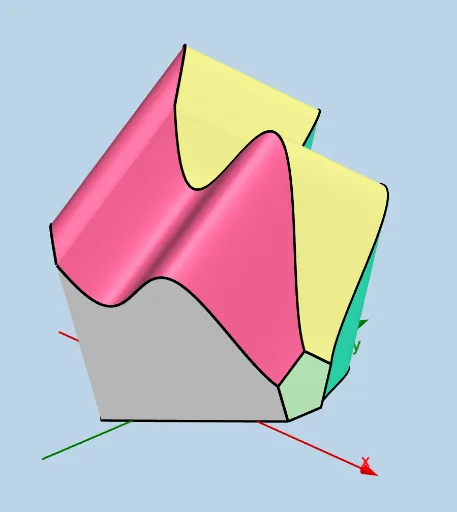
Modifiable Solid: Regular Pentagon Cross Sections Parallel to yAxis
Loading the math board and drawing, please wait…
This example demonstrates a modifiable solid where cross sections parallel to the yAxis are regular pentagons. Core math concepts include calculus-based cross-section analysis, polygon properties in geometry, and integral applications of functions. Construction highlights involve GeoGebra commands like Intersect, Segment, Midpoint, Line, Sphere, etc., to build cross-sections and solid shapes. Suitable for high school and above students learning solid geometry and calculus-based cross-section problems.
GeoGebra Commands & Parameters
Intersect(lower, h, (-10, -2)) → CIntersect(upper, h, (-10, 6.159318853398537)) → BSegment(C, B) → qIntersect(upper, q, (-10, 6.159318853398537)) → GMidpoint(C, G) → TLine(T, T + (1, 0, 0)) → l_1Segment(H, I) → s_1Midpoint(s_1) → ELine(E, E + (1, 0, 0)) → r_1Segment(J, K) → q_1Midpoint(q_1) → FLine(F, F + (1, 0, 0)) → cLine(B, D) → iSphere(B, d) → eSegment(C, B) → pTextfield(upper) → InputBox1Textfield(lower) → InputBox2Textfield(a) → InputBox3Textfield(b) → InputBox4Segment(C, G) → k_1Rotate(J, (2 * pi / 5), Z, c) → J'Rotate(J', (2 * pi / 5), Z, c) → J''Rotate(J'', (2 * pi / 5), Z, c) → J'''Polygon(K, J, J', J'', J''') → poly1, k, j, j', j'', j'''Rotate(H, (2 * pi / 5), A_1, r_1) → H'Rotate(H', (2 * pi / 5), A_1, r_1) → H''Rotate(H'', (2 * pi / 5), A_1, r_1) → H'''Polygon(H, H', H'', H''', I) → poly2, h_2, h', h'', h''', i_1Rotate(G, (2 * pi / 5), B_1, l_1) → G'Rotate(G', (2 * pi / 5), B_1, l_1) → G''Rotate(G'', (2 * pi / 5), B_1, l_1) → G'''Polygon(C, G, G', G'', G''') → poly3, c_1, g, g', g'', g'''Segment(K, J''') → fSegment(J''', J'') → lSegment(J'', J') → mSegment(J', J) → nSegment(H''', I) → rSegment(H''', H'') → sSegment(H'', H') → tSegment(H', H) → f_1Segment(C, G''') → g_1Segment(G''', G'') → j_1Segment(G'', G') → m_1Segment(G', G) → n_1CurveCartesian(t, (0.5 * (upper(t) + lower(t))), ((0.5 * (upper(t) - lower(t))) * (tan((3 * pi / 10)) + 1 / cos((3 * pi / 10)))), t, a, b) → uCurveCartesian(t, (0.5 * (upper(t) + lower(t))) - (sin((3 * pi / 10)) * (upper(t) - lower(t))), ((upper(t) - lower(t)) * sin((2 * pi / 5))), t, a, b) → oCurveCartesian(t, (0.5 * (upper(t) + lower(t))) + (sin((3 * pi / 10)) * (upper(t) - lower(t))), ((upper(t) - lower(t)) * sin((2 * pi / 5))), t, a, b) → vSurface(u, lower(u) - ((cos((2 * pi / 5)) * (upper(u) - lower(u))) * v), (((upper(u) - lower(u)) * sin((2 * pi / 5))) * v), u, a, b, v, 0, 1) → wSurface(u, upper(u) + ((cos((2 * pi / 5)) * (upper(u) - lower(u))) * v), (((upper(u) - lower(u)) * sin((2 * pi / 5))) * v), u, a, b, v, 0, 1) → a_1Surface(u, (0.5 * (upper(u) + lower(u))) - ((upper(u) - lower(u)) * sin((3 * pi / 10))) + ((sin((3 * pi / 10)) * (upper(u) - lower(u))) * v), ((upper(u) - lower(u)) * sin((2 * pi / 5))) + (((upper(u) - lower(u)) * cos((3 * pi / 10))) * v), u, a, b, v, 0, 1) → b_1Surface(u, (0.5 * (upper(u) + lower(u))) + ((sin((3 * pi / 10)) * (upper(u) - lower(u))) * v), ((0.5 * (upper(u) - lower(u))) * (tan((3 * pi / 10)) + 1 / cos((3 * pi / 10)))) - (((upper(u) - lower(u)) * cos((3 * pi / 10))) * v), u, a, b, v, 0, 1) → d_1
AI Drawing Prompt Reference
Create a modifiable solid where cross-sections parallel to the y-axis are regular pentagons. Start by defining the upper and lower boundaries, then calculate key points and connect them to form segments. Construct regular pentagons based on these segments. Rotate these pentagons around a central axis to create a continuous solid structure. Finally, combine all the rotated pentagons to display the complete shape of the solid.
The prompt above was compiled from the original drawing commands and is for reference only.