
Modifiable Random Polygons
Loading the math board and drawing, please wait…
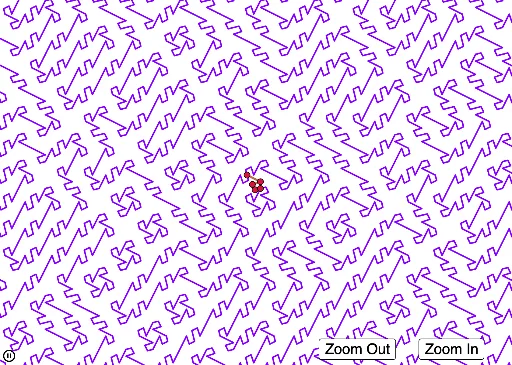
This example demonstrates the generation of random polygons with user-modifiable vertices. It involves core math concepts like stochastic processes, combinatorics, variance, circles, LCM, and GCD. Construction highlights include using GeoGebra commands/objects such as Point, PolyLine, Mirror, and Sequence. Suitable for high school mathematics teaching to understand random图形 generation and transformations.
GeoGebra Commands & Parameters
Point(yAxis) → APoint(xAxis) → EPolyLine(A, B, C, D, E) → fMirror(A, (0, 0)) → A'Mirror(B, (0, 0)) → B'Mirror(C, (0, 0)) → C'Mirror(D, (0, 0)) → D'Mirror(E, (0, 0)) → E'PolyLine(A', B', C', D', E') → f'Sequence(Sequence[Translate[Rotate[{f, f'}, RandomElement[{0, π / 2}]], (a, b)], a, -22, 22, 2], b, -22, 22, 2) → l1
AI Drawing Prompt Reference
Draw a random polygon with vertices that can be modified. Start by placing two points on the x-axis and y-axis of a coordinate system, then connect these five points to form a pentagon. Next, create mirrored versions of this pentagon and its reflection, rotating them by 0 or 90 degrees around the origin and translating them to various positions in the coordinate system to generate multiple random polygons.
The prompt above was compiled from the original drawing commands and is for reference only.