
Modeling Decimal Multiplication
Loading the math board and drawing, please wait…
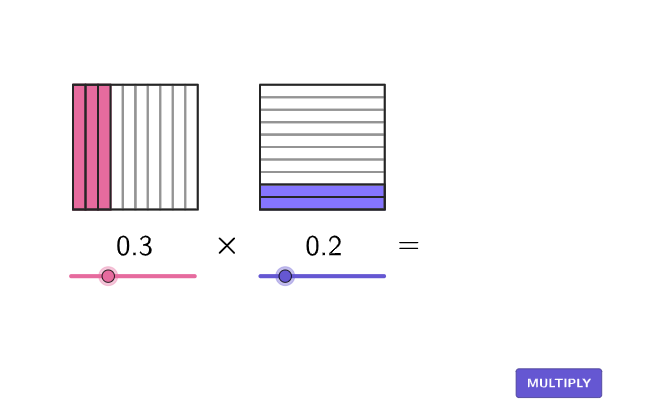
This example uses area models to demonstrate decimal multiplication, helping students understand the process. It utilizes GeoGebra commands such as If, Sequence, Midpoint, Polygon, Corner, Translate, Join, and Zip, suitable for students in grades 4-5.
GeoGebra Commands & Parameters
If(animateTimer < 1, animateTimer, 1) → animate1If(animateTimer < 2, 0, If[animateTimer > 3, 1, animateTimer - 2]) → animate2Sequence(boxTool[1, 10, AnchorA + (K, 0)], K, 0, numTenthsA - 1) → tenthsAMidpoint(AnchorA, AnchorB) → AnchorCPolygon(Zip[PixelsToPoint[Corner[1], Corner[3], Corner[5], A], A, {(pixelsLeft, pixelsTop), (pixelsLeft, y(Corner[5]) - pixelsBottom), Corner[5] - (pixelsRight, pixelsBottom), (x(Corner[5]) - pixelsRight, pixelsTop)}]) → borderBoxCorner(5) → layoutAppSizeSequence(boxTool[10, 1, AnchorB + (0, K)], K, 0, numTenthsB - 1) → tenthsBTranslate(tenthsA, Vector[(animate1 * Vector[AnchorA, AnchorC]) + (animate2 * Vector[AnchorC, AnchorD])]) → moveATranslate(tenthsB, Vector[(animate1 * Vector[AnchorB, AnchorC]) + (animate2 * Vector[AnchorC, AnchorD])]) → moveBSequence(Sequence[boxTool[1, 1, AnchorD + (i, j)], i, 0, numTenthsA - 1], j, 0, numTenthsB - 1) → answerArea, {{1, 1, 1}, {1, 1, 1}}Join({tenthsA, tenthsB}) → tenthsFramesJoin({moveA, moveB}) → moveFramesZip(Translate[boxTool[10, 10, K], Vector[(animate1 * Vector[K, AnchorC]) + (animate2 * Vector[AnchorC, AnchorD])]], K, {AnchorA, AnchorB}) → moveFrameABZip(boxTool[10, 10, A], A, {AnchorA, AnchorB}) → boxFramesSequence(boxTool[1, 10, AnchorA + (K, 0)], K, 0, 9, 1) → boxDividersLeftSequence(boxTool[10, 1, AnchorB + (0, K)], K, 0, 9, 1) → boxDividersRightTranslate(boxDividersLeft, Vector[(animate1 * Vector[AnchorA, AnchorC]) + (animate2 * Vector[AnchorC, AnchorD])]) → moveDividersATranslate(boxDividersRight, Vector[(animate1 * Vector[AnchorB, AnchorC]) + (animate2 * Vector[AnchorC, AnchorD])]) → moveDividersB
AI Drawing Prompt Reference
Draw a graphic that models decimal multiplication using area models. The graphic should include a large rectangle and two smaller rectangles representing the multiplicand and multiplier. These smaller rectangles should be connected by a line and placed within the large rectangle. The graphic should clearly illustrate the multiplication process to help understand decimal multiplication.
The prompt above was compiled from the original drawing commands and is for reference only.