
Missing Square Paradox (Curry) Part 2: Geometry and Slope
Loading the math board and drawing, please wait…
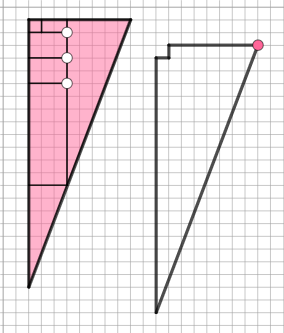
This example demonstrates the Missing Square Paradox in geometric figures, highlighting the relationship between area calculation and slope. Key mathematical concepts include area difference, slope, geometric construction, and parametric curves. Construction involves using GeoGebra commands like Polygon, Segment, Circle, Point, Line, OrthogonalLine, and Intersect. Suitable for high school students or college undergraduates learning geometry and mathematical analysis.
GeoGebra Commands & Parameters
Polygon(A, B, C) → t1, c, a, bPolygon(J, K, L, O) → poly2, j, k, l, mPolygon(P, Q, F_1) → t2, p, q, rSegment(F_1, Q) → i_2Circle(B_1, 3) → dPoint(d) → GLine(B_1, G) → fOrthogonalLine(G, f) → gCircle(G, 2) → eIntersect(e, g, 2) → HOrthogonalLine(H, g) → hOrthogonalLine(B_1, f) → iIntersect(h, i) → IPolygon(B_1, G, H, I) → q1, n, g_2, h_2, i_3Circle(D, 3) → c_1Point(c_1) → ELine(D, E) → m_1OrthogonalLine(E, m_1) → n_1Circle(E, 2) → d_1Intersect(d_1, n_1, 2) → FOrthogonalLine(F, n_1) → p_1OrthogonalLine(D, m_1) → e_1Intersect(p_1, e_1) → RPolygon(D, E, F, R) → q2, d_2, e_2, f_2, r_2Polygon(C_1, D_1, K_1, L_1) → q3, j_2, k_2, l_2, s_2Circle(N_1, 2) → c_2Point(c_2) → O_1Line(N_1, O_1) → t_2OrthogonalLine(O_1, t_2) → a_2Circle(O_1, 1) → c_3Intersect(c_3, a_2, 2) → P_1OrthogonalLine(P_1, a_2) → b_2OrthogonalLine(N_1, t_2) → f_3Intersect(b_2, f_3) → Q_1Polygon(N_1, O_1, P_1, Q_1) → q4, g_3, o_1, h_3, j_3Segment(S, T) → sSegment(T, U) → tSegment(U, S) → f_1Segment(V, W) → g_1Segment(W, Z) → h_1Segment(Z, A_1) → i_1Segment(A_1, E_1) → j_1Segment(E_1, V) → k_1Segment(A, B) → l_1Segment(B, C) → q_1Segment(A, C) → r_1Segment(P, Q) → s_1Segment(Q, F_1) → t_1Segment(P, F_1) → a_1Segment(J, K) → b_1Segment(K, L) → m_2Segment(L, O) → n_2Segment(O, J) → p_2Segment(B_1, G) → q_2Segment(G, H) → k_3Segment(H, I) → l_3Segment(I, B_1) → m_3Segment(D, E) → n_3Segment(E, F) → p_3Segment(F, R) → q_3Segment(R, D) → r_3Segment(N_1, O_1) → s_3Segment(O_1, P_1) → t_3Segment(P_1, Q_1) → a_3Segment(Q_1, N_1) → b_3Segment(C_1, D_1) → d_3Segment(K_1, D_1) → e_3Segment(K_1, L_1) → f_4Segment(C_1, L_1) → g_4
AI Drawing Prompt Reference
Draw a geometric figure composed of multiple quadrilaterals and triangles, including a square with a missing corner and two right-angled triangles. Start by drawing a square with a missing corner, then construct two right-angled triangles with their right angles touching the sides of the square. Use circles and perpendicular lines to generate a series of smaller triangles and quadrilaterals, forming a complex geometric pattern.
The prompt above was compiled from the original drawing commands and is for reference only.