
Midpoints of Non-Coplanar Segments
Loading the math board and drawing, please wait…
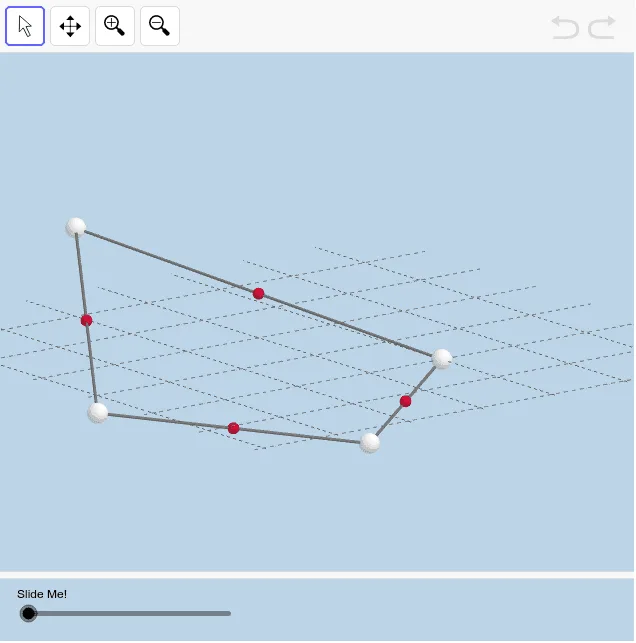
This example demonstrates a quadrilateral formed by the midpoints of four consecutive segments connecting four non-coplanar points. Through dynamic illustration, observe and analyze the properties of this quadrilateral. The example involves geometric concepts such as midpoints and quadrilaterals, constructed using GeoGebra commands like Segment, Midpoint, and Polygon. Suitable for middle school and above students or teachers to understand the properties of non-coplanar quadrilaterals.
GeoGebra Commands & Parameters
Segment(A, D) → fSegment(D, C) → gSegment(C, B) → hSegment(B, A) → iMidpoint(f) → EMidpoint(g) → FMidpoint(h) → GMidpoint(i) → HPolygon(G, H, E, F) → poly1, g_1, h_1, e, f_1Dilate(H, If[0 < a ≤ 1, 1 - a, 0], E) → H'Segment(H, H') → jDilate(E, If[1 < a ≤ 2, 2 - a, 0], F) → E'Segment(E, E') → kDilate(F, If[2 < a ≤ 3, 3 - a, 0], G) → F'Vector(F, F') → uTranslate(E, u) → E'_1Translate(E', u) → E''Segment(E'_1, E'') → k'Dilate(H, If[3 < a ≤ 4, 4 - a, 0], G) → H'_1Vector(H, H'_1) → vTranslate(H, v) → H'_2Translate(H', v) → H''Segment(H'_2, H'') → j'
AI Drawing Prompt Reference
Draw a quadrilateral formed by the midpoints of four line segments connecting four non-coplanar points. The points are not in the same plane, so the quadrilateral is a spatial quadrilateral. First, draw the four line segments. Then, find the midpoint of each segment. Next, connect these midpoints to form the quadrilateral. Observing this quadrilateral helps understand the relationship between midpoints and line segments.
The prompt above was compiled from the original drawing commands and is for reference only.