
Midpoint Exercise
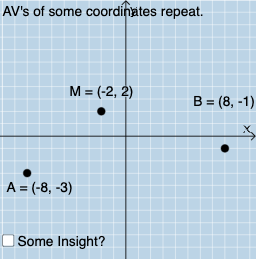
Loading the math board and drawing, please wait…
This example demonstrates how to find the midpoint of a line segment through geometric construction. Key mathematical concepts include coordinate geometry and the definition of a line segment midpoint. It uses commands such as PointIn, Segment, Intersect, Polygon, Angle, Dilate, Vector, Translate, etc., in GeoGebra. Suitable for middle school and above students for geometric construction practice.
GeoGebra Commands & Parameters
PointIn(v) → MPointIn(v) → APointIn(v) → BSegment(A, M) → fSegment(M, B) → gIntersect(h, eq1) → DPolygon(M, D, A) → t1, b, a, dIntersect(eq3, p) → EPolygon(M, E, B) → t2, c, a_1, eSegment(A, D) → iSegment(D, M) → jSegment(M, E) → kSegment(E, B) → lAngle(B, E, M) → αAngle(M, D, A) → βDilate(A, If[0 < m ≤ 1, 1 - m, 0], M) → B'Vector(A, B') → uTranslate(M, u) → A'Translate(D, u) → D'Translate(A, u) → B'_{1}Polygon(A', D', B'_{1}) → t1', b'_{1}, a', d'Mode(l1) → l2If(Length[l2] ≟ 0, "AV's of all coordinates are different.", "AV's of some coordinates repeat.") → text1
AI Drawing Prompt Reference
Draw a line segment AB, find its midpoint M, then draw line segments MD and ME starting from M. Construct triangles AMD and BME. Use the Dilate command to enlarge point A to B', and then use Vector and Translate commands to move M, D, and A to M', D', and A' respectively, and finally draw triangle A'D'B'₁.
The prompt above was compiled from the original drawing commands and is for reference only.