
Messing with Lisa: Interactive Intro to Transformational Geometry
Loading the math board and drawing, please wait…
In collections
Congruence (CO) Cluster
Congruence (Vol 1)
Geometry Review
Congruence (Vol 1) Over 80 Resources
Geometry (Congruence) Volume 1
CCSS High School: Geometry (Congruence) Volume 1 S N ATTAR
CCSS High School: Geometry (Congruence) Volume 1
CCSS High School: Geometry (Congruence) Volume 1
CCSS High School: Geometry (Congruence) Volume 1
CCSS High School: Geometry (Congruence) Volume 1
CCSS High School: Geometry (Congruence) Volume 1
CCSS High School: Geometry (Congruence) Volume 1
CCSS High School: Geometry (Congruence) Volume 1
CCSS High School: Geometry (Congruence) Volume 1
CCSS High School: Geometry (Congruence) Volume 1
CCSS High School: Geometry (Congruence) Volume 1
CCSS High School: Geometry (Congruence) Volume 1
CCSS High School: Geometry (Congruence) Volume 1
Transformations! (Geometry)
Transformations/Symmetry
Prove Congruence through Transformations
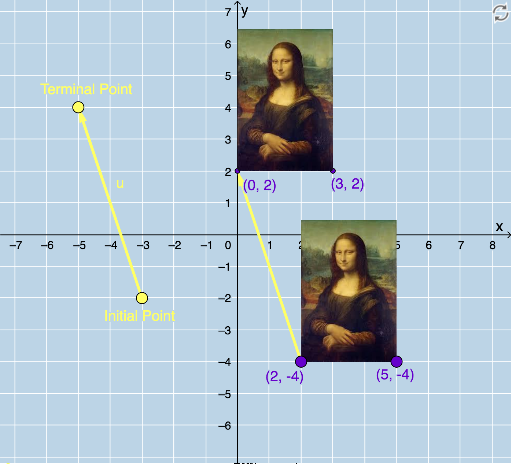
① This example demonstrates how a playful graphic (a stylized portrait named 'Lisa') can be transformed through translation, rotation, reflection, and dilation, showing changes in position, orientation, and size. ② Core mathematical concepts include geometric transformations (translation, rotation, reflection, dilation), vectors, angles, area, and even polynomial functions and slope as extensions. ③ Construction highlights: using GeoGebra commands like Vector, Translate, Rotate, CircleArc, Circle, Line, Mirror, Dilate, and Textfield, the applet creates multiple transformed copies (e.g., pic1', B', C') and allows interactive control via sliders or buttons. ④ This is ideal for middle school to high school students learning transformational geometry, and for teachers to demonstrate transformation properties and compositions in a dynamic, visual way.
GeoGebra Commands & Parameters
Vector(D, E) → uTranslate(pic1, u) → pic1'Translate(B, u) → B'Translate(C, u) → C'Vector(B, B') → vRotate(C, δ, A) → C'_1CircleArc(A, C'_1, C) → cCircleArc(A, C, C'_1) → dCircle(A, C) → eLine(F, G) → fMirror(pic1, f) → pic1'_2Mirror(B, f) → B'_2Mirror(C, f) → C'_2Dilate(pic1, k, A) → pic1'_3Dilate(B, k, A) → B'_3Dilate(C, k, A) → C'_3Rotate(B, δ, A) → B'_1Rotate(pic1, δ, A) → pic1'_1Circle(A, C) → pCircleArc(A, C'_1, C) → rTextfield(δ) → InputBox1Textfield(k) → InputBox2