
Mesh-Element Generation on a Rectified Truncated Icosahedron (V=90) and Its Dual
Loading the math board and drawing, please wait…
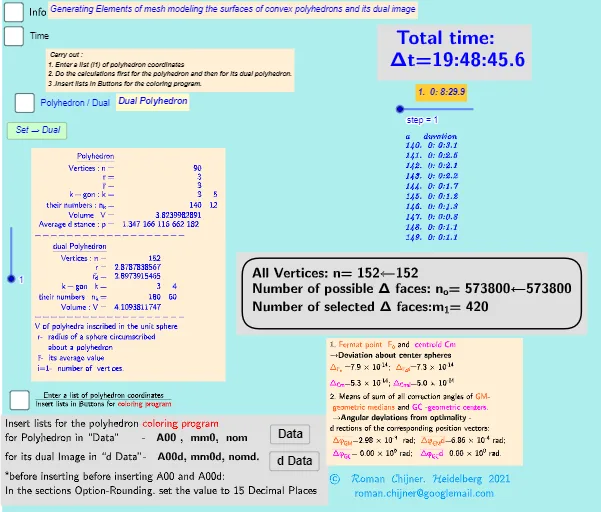
This example demonstrates how to generate mesh elements on the surfaces of a rectified truncated icosahedron (with parameter V=90) and to model the corresponding mesh on its dual solid. It visualizes a discrete surface construction: vertices/edges/faces are produced by applying geometric constraints and then assembling them into a structured surface grid. Key mathematical ideas include solid geometry and duality, surface/spherical meshing, and vector-length–based rules for constructing geometric elements. The build is data- and rule-driven: Length is used to enforce distance/size constraints; Sequence creates indexed batches of candidates; TableText and Text label or display computed values; If together with Div supports conditional selection; IndexOf/First help retrieve specific elements from sets; Sum aggregates quantities for summary readouts (e.g., volume-related objects such as Vol, Volsphere). Suitable for advanced high-school through early university levels, especially students studying 3D geometry, computational geometry, and GeoGebra-based algorithmic visualization.
GeoGebra Commands & Parameters
Text("" + p) → txt_pSum(Flatten[Sequence[Append[Sequence[Element[txt_p, i], i, m01(k), m02(k)], " "], k, 1, 5]]) → txtUm1If(bu0, A00, A00d) → A00_0Length(A00_0) → nLength(l2) → läl2Sequence(sgn(Determinant[{Element[A00_0, i1] - Element[A00_0, j], Element[A00_0, i2] - Element[A00_0, j], Element[A00_0, i3] - Element[A00_0, j]}]), j, 1, n) → l01Length(A00d) → zzzSum(Zip[(T * F), T, SysTimeAkt1, F, {1, 1000, 60000, 3600000, 86400000}]) → TimeAbs1Sum(Zip[(T * F), T, SysTimeAkt2, F, {1, 1000, 60000, 3600000, 86400000}]) → TimeAbs2Div(TimeRelab, 3600) → HDiv(TimeRelab - (H * 3600), 60) → MElement(ZwZeit, step) → text10TableText({Append["a duration", Last[ZwZeit, Min[10, Length[ZwZeit]]]]}, "v") → text2cLength(A00) → lm1If(Length[Unique[l01 \ {0}]] ≟ 1, 7, -7) → a7Sum(Zip[(T * F), T, SysTimeAkt0, F, {1, 1000, 60000, 3600000, 86400000}]) → TimeAbs0Div(TimeRelab0, 3600) → H0Div(TimeRelab0 - (H0 * 3600), 60) → M0Text("" + (TimeRelab0 - (H0 * 3600) - (M0 * 60))) → S0aText("" + (TimeRelab - (H * 3600) - (M * 60))) → SIndexOf(".", S) → indexIndexOf(".", S0a) → indexaFirst(S, index + 1) → txtSFirst(S0a, indexa + 1) → txtS0aIf(bu0, " ", "d") → txtbuoMax(Length[A00], Length[A00d]) → maxläElement(A00, 24) → m11TableText({{"\underline{Polyhedron}"}, Append["Vertices: n=", {Length[A00]}], Append["r=", {r}], Append["\bar{r}=", {r_m}], Append["k-gon : k=", mm5a], Append["their\; numbers: n_k=", mm7a], Append["Volume: V=", {Vol_r}], Append["Average\; distance: p=", {txtUm1}]}, "hr ") → text7TableText({{"\underline{dual\;Polyhedron}"}, Append["Vertices: n=", {Length[A00d]}], Append["r=", {r_d}], Append[" \bar{r_d}= ", {r_md}], Append["k-gon : k=", mm5ad], Append["their\; numbers: n_k=", mm7ad], Append["Volume: V=", {Vold_r}]}, "hr ") → text20
AI Drawing Prompt Reference
Draw a rectified truncated icosahedron with 90 vertices, edges, and faces. Start by creating vertices, then connect them to form edges, and finally assemble into faces. Also show the dual polyhedron, including the number of vertices, edges, and faces, as well as volume and average distance.
The prompt above was compiled from the original drawing commands and is for reference only.