
Maximizing Rectangle Area
Loading the math board and drawing, please wait…
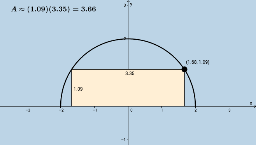
This example demonstrates maximizing the area of a rectangle using calculus. Core math concepts include derivatives and optimization. GeoGebra commands used are Point, OrthogonalLine, Intersect, Mirror, Segment, Polygon, and Area; suitable for Calculus 1 students learning optimization problems.
GeoGebra Commands & Parameters
Point(f) → AOrthogonalLine(A, a) → bIntersect(a, b) → BMirror(A, c) → A'Segment(A, B) → dMirror(A, c) → A'_1Mirror(B, c) → B'Segment(A'_1, B') → d'Segment(A'_1, A) → ePolygon(B', B, A, A'_1) → poly1, b', b_1, a_1, a'_1Area(poly1) → hSegment(B', B) → iSegment(C, D) → j
AI Drawing Prompt Reference
Draw a rectangle to maximize its area. Start by defining a line a, then pick a point A on a and draw a perpendicular line b through A, with the intersection of a and b being B. Next, reflect A over line c to get A', then connect A' and B with line segment d', reflect A' to get A'_1, connect A'_1 and B' with line segment d, and connect A'_1 and A with line segment e. Finally, use B', B, A, and A'_1 as vertices to form a quadrilateral and calculate its area.
The prompt above was compiled from the original drawing commands and is for reference only.