
Matrix Transformations by Mr BM
Loading the math board and drawing, please wait…
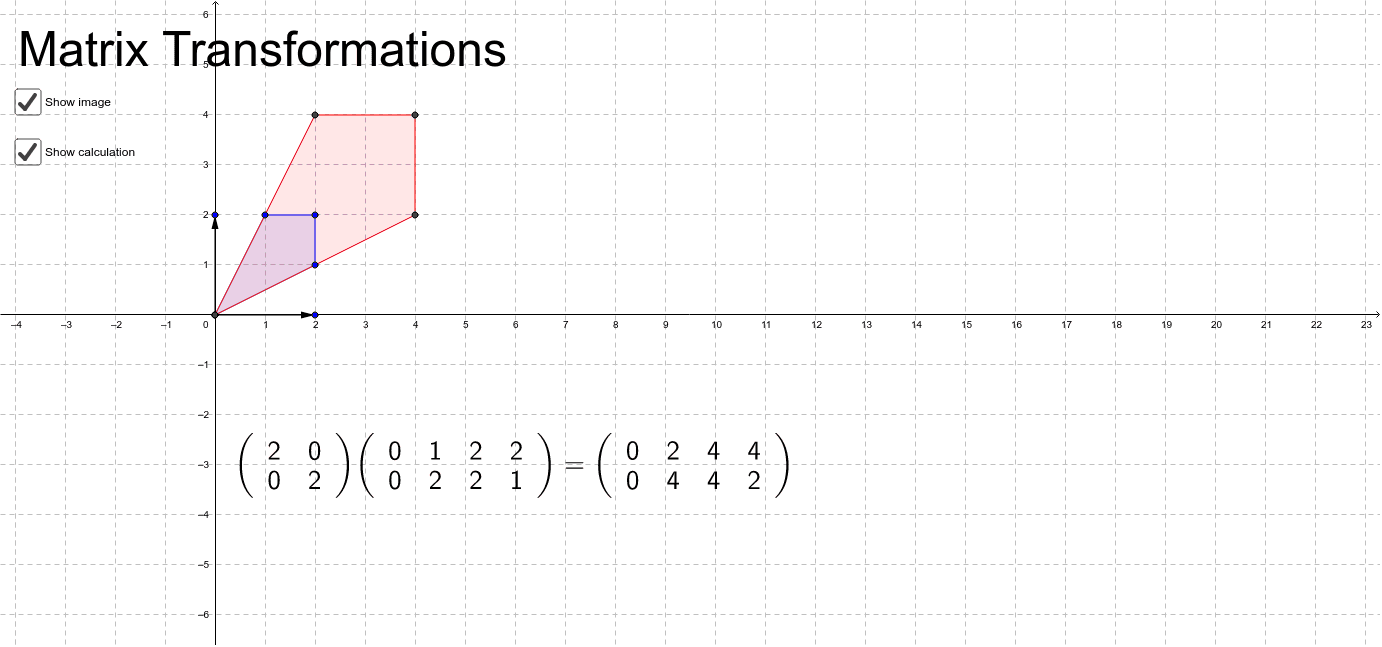
This example demonstrates matrix transformations by adjusting vectors and showing the image of the transformation. Key mathematical concepts include matrix transformations. It uses commands like Intersect, Vector, and Polygon in GeoGebra. Suitable for high school and above students.
GeoGebra Commands & Parameters
Intersect(xAxis, yAxis) → CVector(C, B) → uVector(C, A) → vPolygon(D, E, F, G) → poly1, d_1, e, f, gPolygon(D, K, J, I) → poly2, d_2, k, j, i
AI Drawing Prompt Reference
Draw a coordinate plane with the origin at the center. From the origin, draw two vectors pointing to two distinct points, representing the basis vectors before transformation. Then draw two quadrilaterals: one formed by four points, and another formed by four different points, both positioned near the origin to illustrate the effect of a matrix transformation. The two quadrilaterals should be related, showing how the shape changes under the linear map. The overall figure should clearly display the correspondence between vectors and polygons in the transformation.
The prompt above was compiled from the original drawing commands and is for reference only.