
Matching Verbal Statements to Algebraic Statements (V2)
Loading the math board and drawing, please wait…
In collections
Solving Linear Equations: Application Problems
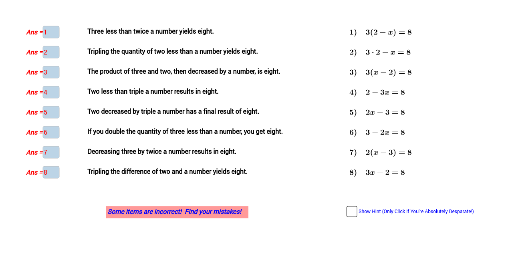
This interactive GeoGebra example is a matching exercise that helps students connect verbal descriptions (e.g., 'twice a number plus three') with their corresponding algebraic expressions or equations. It presents multiple text fields and input boxes, allowing learners to select or type the correct algebraic form for each verbal statement, thereby reinforcing the translation between natural language and symbolic algebra. The core mathematical concepts include linear equations, algebraic terms, multiplication, symmetry, and trigonometric functions, though the primary focus is on algebraic expression translation and matching. The construction uses the Textfield command to create text input areas, along with numerous text objects (text1, text2, etc.) and input boxes (InputBox1 through InputBox8) to build an interactive interface with dynamic feedback. This resource is suitable for middle school to high school students, ideal for introductory algebra, equation modeling, or classroom interactive activities, and can also serve as a template for teachers to create customized practice sets.
GeoGebra Commands & Parameters
Textfield(a) → InputBox1Textfield(b) → InputBox2Textfield(c) → InputBox3Textfield(d) → InputBox4Textfield(g) → InputBox5Textfield(h) → InputBox6Textfield(i) → InputBox7Textfield(j) → InputBox8
AI Drawing Prompt Reference
Create an interactive matching exercise showing several verbal algebra statements on the left (e.g., “twice a number plus three”) and eight blank input boxes on the right for students to type the corresponding algebraic expressions, arranged in clear paired rows so learners can enter answers and receive immediate feedback. The layout presents each verbal prompt next to its own answer field, using a simple two‑column design with consistent spacing, and includes visual cues such as labels or numbering to guide the user through the eight pairs.
The prompt above was compiled from the original drawing commands and is for reference only.