
Matching Like Terms by Edward Knote
Loading the math board and drawing, please wait…
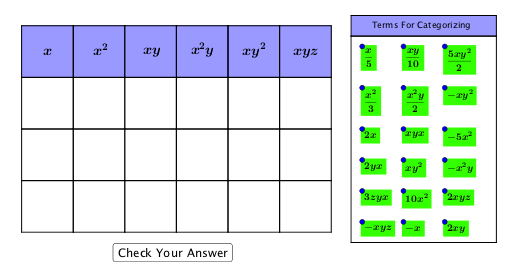
This example demonstrates how to use GeoGebra for matching like terms, visually illustrating the process of algebraic simplification. It involves core math concepts like like terms identification, algebraic operations, and polynomial combination. Key GeoGebra commands and objects used in the construction include Intersect, Point, Polygon, Midpoint, Line, and OrthogonalLine. Suitable for high school students and teachers for algebra learning and teaching demonstrations.
GeoGebra Commands & Parameters
Intersect(xAxis, yAxis) → APoint(xAxis) → BPolygon(A, B, 4) → poly1, f, g, h, i, C, DPolygon(C, B, 4) → poly2, j, k, l, m, E, FPolygon(F, E, 4) → poly3, n, p, q, r, G, HPolygon(H, G, 4) → poly4, s, t, a, b, I, JPolygon(J, I, 4) → poly5, c, d, e, f_1, K, LPolygon(L, K, 4) → poly6, g_1, h_1, i_1, j_1, M, NPolygon(B, A, 4) → poly7, k_1, l_1, m_1, n_1, O, PPolygon(E, B, 4) → poly8, p_1, q_1, r_1, s_1, Q, RPolygon(G, E, 4) → poly9, t_1, a_1, b_1, c_1, S, TPolygon(I, G, 4) → poly10, d_1, e_1, f_2, g_2, U, VPolygon(K, I, 4) → poly11, h_2, i_2, j_2, k_2, W, ZPolygon(M, K, 4) → poly12, l_2, m_2, n_2, p_2, A_1, B_1Polygon(P, O, 4) → poly13, q_2, r_2, s_2, t_2, C_1, D_1Polygon(R, P, 4) → poly14, a_2, b_2, c_2, d_2, E_1, F_1Polygon(T, R, 4) → poly15, e_2, f_3, g_3, h_3, G_1, H_1Polygon(V, T, 4) → poly16, i_3, j_3, k_3, l_3, I_1, J_1Polygon(Z, V, 4) → poly17, m_3, n_3, p_3, q_3, K_1, L_1Polygon(B_1, Z, 4) → poly18, r_3, s_3, t_3, a_3, M_1, N_1Polygon(D_1, C_1, 4) → poly19, b_3, c_3, d_3, e_3, O_1, P_1Polygon(F_1, D_1, 4) → poly20, f_4, g_4, h_4, i_4, Q_1, R_1Polygon(H_1, F_1, 4) → poly21, j_4, k_4, l_4, m_4, S_1, T_1Polygon(J_1, H_1, 4) → poly22, n_4, p_4, q_4, r_4, U_1, V_1Polygon(L_1, J_1, 4) → poly23, s_4, t_4, a_4, b_4, W_1, Z_1Polygon(N_1, L_1, 4) → poly24, c_4, d_4, e_4, f_5, A_2, B_2Midpoint(D, B) → C_2Midpoint(C, E) → D_2Midpoint(F, G) → E_2Midpoint(H, I) → F_2Midpoint(J, K) → G_2Midpoint(L, M) → H_2Midpoint(N, M) → I_2Line(B_5, A_5) → g_5Point(g_5) → J_2Point(g_5) → M_2Line(B_2, Z_1) → i_5OrthogonalLine(J_2, g_5) → j_5OrthogonalLine(M_2, g_5) → k_5Line(K_2, O_2) → h_5Intersect(j_5, h_5) → P_2Intersect(k_5, h_5) → Q_2Polygon(P_2, Q_2, M_2, J_2) → poly25, p_5, q_5, m_5, j_6Polygon(J_2, L_2, N_2, M_2) → poly26, j_7, l_5, n_5, m_6Midpoint(A, P) → L_3Midpoint(A, L_3) → M_3Midpoint(O, D_1) → N_3Midpoint(O, N_3) → O_3Midpoint(C_1, P_1) → P_3Midpoint(C_1, P_3) → Q_3Midpoint(B, R) → R_3Midpoint(B, R_3) → S_3Midpoint(P, F_1) → T_3Midpoint(P, T_3) → U_3Midpoint(D_1, R_1) → V_3Midpoint(D_1, V_3) → W_3Midpoint(E, T) → Z_3Midpoint(E, Z_3) → A_4Midpoint(G, V) → B_4Midpoint(G, B_4) → C_4Midpoint(R, H_1) → D_4Midpoint(R, D_4) → E_4Midpoint(F_1, T_1) → F_4Midpoint(F_1, F_4) → G_4Midpoint(H_1, V_1) → H_4Midpoint(H_1, H_4) → I_4Midpoint(T, J_1) → J_4Midpoint(T, J_4) → K_4Midpoint(I, Z) → L_4Midpoint(I, L_4) → M_4Midpoint(V, L_1) → N_4Midpoint(V, N_4) → O_4Midpoint(J_1, Z_1) → P_4Midpoint(J_1, P_4) → Q_4Midpoint(K, B_1) → R_4Midpoint(K, R_4) → S_4Midpoint(Z, N_1) → T_4Midpoint(Z, T_4) → U_4Midpoint(L_1, B_2) → V_4Midpoint(L_1, V_4) → W_4
AI Drawing Prompt Reference
Start at the origin, place a point on the x-axis, and build a square using these two points as adjacent vertices. Then, successively construct a chain of adjacent squares outward along the sides, creating a stepped arrangement. At the corners of the steps, take midpoints of the sides of adjacent squares and connect them to form a diagonal line. Pick two points on this diagonal, draw perpendiculars from them to intersect another diagonal connecting the step vertices, enclosing a parallelogram. Finally, take several midpoints between the starting and ending squares and connect them to form auxiliary lines, visually representing the matching of like terms in algebra.
The prompt above was compiled from the original drawing commands and is for reference only.