
Making Conjectures and Proofs in GeoGebra: Dynamic Geometry Exploration
Loading the math board and drawing, please wait…
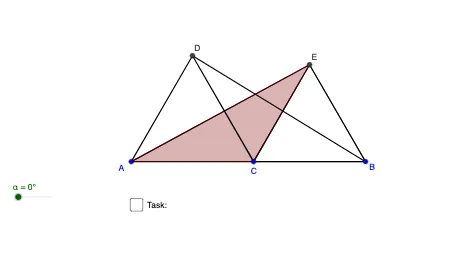
This GeoGebra example demonstrates how to formulate conjectures and support proofs through dynamic geometric construction. It showcases a configuration built from points, segments, and polygons, with rotations creating related or symmetric objects, encouraging students to observe properties, discover patterns, and engage in logical reasoning. Core mathematical concepts include geometric construction, rotational symmetry, polygon area relationships, and patterns involving natural numbers. The construction uses GeoGebra commands such as Segment, Point, Polygon, and Rotate, creating multiple points (A, B, C, D, E), segments (a, b, c, d, e, f), polygons (poly1, poly2, poly3), and their rotated images (A', C', E', poly3'), along with text objects (text1, text2) for annotations. This resource is suitable for middle and high school mathematics, ideal for inquiry-based learning, conjecture testing, and introductory proof writing, as well as for teachers demonstrating dynamic geometric reasoning.
GeoGebra Commands & Parameters
Segment(A, B) → aPoint(a) → CPolygon(A, C, 3) → poly1, b, a_1, c, DPolygon(C, B, 3) → poly2, d, c_1, b_1, ESegment(D, B) → eSegment(A, E) → fPolygon(A, C, E) → poly3, e_1, a_2, c_2Rotate(A, (-α), C) → A'Rotate(C, (-α), C) → C'Rotate(E, (-α), C) → E'Polygon(A', C', E') → poly3', e', a', c'Segment(D, C) → gSegment(D, A) → h
AI Drawing Prompt Reference
Draw a dynamic geometric figure consisting of points and line segments, including two triangles and a hexagon that are related through rotation. Start by drawing a line segment and creating points on it. Use these points to construct two triangles and a hexagon. Then, rotate one of the triangles around one of its vertices by a certain angle to create a new triangle, observing the symmetry and area relationships between the rotated and original figures. Connect key points with line segments and add text annotations to describe the properties of the shapes and the rotation angle.
The prompt above was compiled from the original drawing commands and is for reference only.