
Pappus Area Theorem-2: Area Relations on a General Quadrilateral via Geometric T
Loading the math board and drawing, please wait…
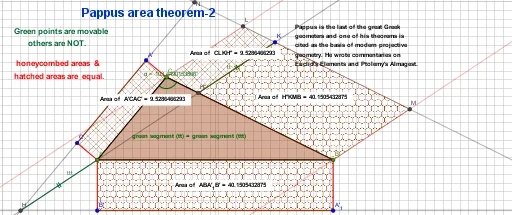
This GeoGebra example demonstrates the second construction of Pappus's area theorem, showing area equalities on an arbitrary general quadrilateral by constructing specific triangles and applying reflections and midpoints. The core mathematical concepts include Pappus's area theorem, general quadrilaterals, triangle areas, geometric transformations (reflection), midpoints, and angle bisectors. The construction uses GeoGebra commands such as Polygon, Segment, LineBisector, Point, Line, Mirror, Intersect, Midpoint, PointIn, and Angle, creating quadrilateral vertices A, B, C, D and auxiliary points E, F, G, H, I, J, with reflected points A', B', C', H' to build area relationships through segments and polygons. Suitable for high school and above, this example is ideal for studying geometric theorems, area proofs, and dynamic geometry exploration, as well as for teachers demonstrating transformations and area invariance.
GeoGebra Commands & Parameters
Polygon(A, B, C) → t1, c, a, bSegment(A, C) → fSegment(A, B) → gSegment(C, B) → hLineBisector(A, B) → iLineBisector(A, C) → jPoint(i) → DPoint(j) → EPoint(j) → FPoint(i) → GLine(F, b) → kLine(G, c) → lMirror(A, G) → A'_{1}Mirror(B, G) → B'Segment(A'_{1}, B') → c'Mirror(C, F) → C'Mirror(A, F) → A'Segment(C', A') → b'Segment(A, B') → mSegment(B, A'_{1}) → nSegment(A, C') → pSegment(C, A') → qLine(A', C') → rLine(B', A'_{1}) → sIntersect(r, s) → HSegment(A, H) → tttLine(H, A) → dLine(C, d) → eLine(B, d) → f_1Intersect(d, a) → IMidpoint(I, H) → JMirror(A, J) → A'_{2}Mirror(H, J) → H'Segment(A'_{2}, H') → t'Mirror(A'_{2}, I) → KMirror(H', I) → H''Segment(K, H'') → ttLine(K, a) → tIntersect(e, t) → LIntersect(f_1, t) → MIntersect(r, t) → NIntersect(s, t) → OPolygon(C, L, K, H'') → q4, c_3, l_2, k_1, h''Polygon(A', C, A, C') → q5, i_1, c_4, a_3, j_1Polygon(H'', K, M, B) → q6, n_1, k_2, m_2, b_3Polygon(A, B, A'_{1}, B') → q7, a_4, b_4, p_1, q_1PointIn(q4) → Pointq4PointIn(q5) → Pointq5PointIn(q6) → Pointq6PointIn(q7) → Pointq7Angle(A, C, B) → α
AI Drawing Prompt Reference
Construct a plane figure starting from a general quadrilateral with vertices A, B, C (and the related boundary through the segments AB, BC, and CA). Build auxiliary directions from the angle bisectors of segments AB and AC to define two base lines, take their intersections to obtain key points D and E/F/G, and draw rays/lines through the points F and G to set up two main direction lines. Reflect A and B across G to get A′ and B′, reflect C across F to get C′, then connect A′B′ and C′A′. Form the line through A′ and C′ together with a line through B′ and A′, intersect them to get H. Draw segments from A to H, pass a line through H to intersect the existing sides and determine points such as I and the midpoint J of the segment IH. Reflect A across J to get A′2 and reflect H across J to get H′, then connect A′2 to H′ and use further reflections involving I to define points K and H″. Finally, draw the main polygonal regions using points like C, L, K, H″, A′, C, A, and C′, matching the area-relationship configuration with all key constructed connections.
The prompt above was compiled from the original drawing commands and is for reference only.