
Logarithmic Spiral on an Equilateral Triangle
Loading the math board and drawing, please wait…
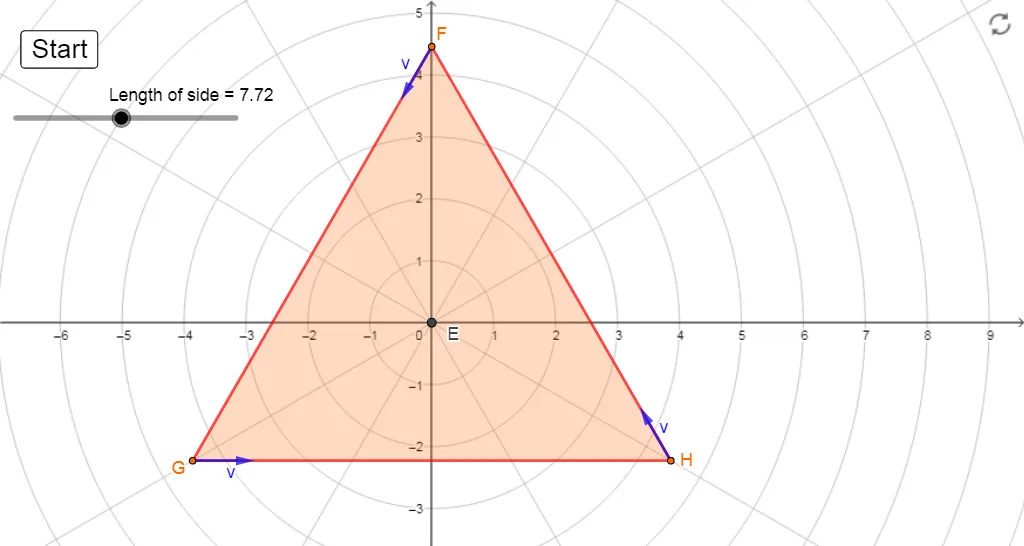
This example demonstrates a logarithmic spiral on an equilateral triangle. It involves key concepts of logarithmic functions and coordinate geometry. Using GeoGebra commands such as Intersect, Rotate, and Length, a logarithmic spiral can be constructed. Suitable for high school mathematics education, particularly in coordinate geometry and functions.
GeoGebra Commands & Parameters
Intersect(xAxis, yAxis) → ACircle(A, sideLength / sqrt(3)) → cIntersect(c, yAxis, 2) → BCircle(B, sideLength) → dIntersect(d, c) → C, D, ,Segment(B, D) → fSegment(D, C) → gSegment(C, B) → hPolygon(B, D, C) → t1, c_1, b, d_1Rotate(B, 30°, A) → B'Rotate(D, 30°, A) → D'Rotate(C, 30°, A) → C'Polygon(B', D', C') → triangle, c', b', d'Intersect(xAxis, yAxis) → ELength(Segment[B', C']) → aCurveCartesian(((a / sqrt(3) * ℯ^(((-sqrt(3)) * θ))); θ), θ, 0, (2 * 3.141592653589793)) → curve1OrthogonalLine(E, d') → jMirror(curve1, j) → i'LineBisector(b') → kLineBisector(c') → lMirror(i', l) → curve3Mirror(i', k) → curve2Rotate(curve1, (-(30°)), E) → curve1'Rotate(curve3, (-(30°)), E) → curve3'Rotate(curve2, (-(30°)), E) → curve2'Point(curve2') → FPoint(curve3') → GPoint(curve1') → HPolygon(F, G, H) → t2, h_1, f_1, g_1Circle(G, 1) → pTangent(G, curve3') → iIntersect(p, i) → I, JVector(G, J) → uTangent(H, curve1') → mCircle(H, 1) → qIntersect(q, m, 2) → KVector(H, K) → vTangent(F, curve2') → nCircle(F, 1) → rIntersect(r, n, 2) → LVector(F, L) → w
AI Drawing Prompt Reference
Draw an equilateral triangle and construct a logarithmic spiral on it. Start by creating an equilateral triangle, then rotate its vertices around the center to form a new triangle. Next, construct a logarithmic spiral between the sides of the new triangle through rotation and mirroring operations, resulting in a complex logarithmic spiral pattern.
The prompt above was compiled from the original drawing commands and is for reference only.