
Locating Segment Midpoints and Endpoints on the Coordinate Plane
Loading the math board and drawing, please wait…
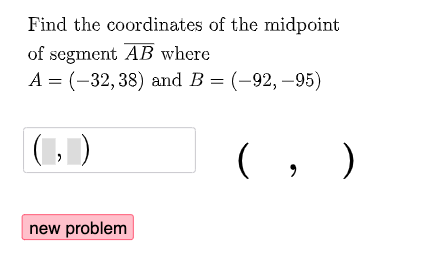
This GeoGebra example demonstrates how to identify a segment’s midpoint on the coordinate plane using interactive/randomly generated points, and how to clearly display the corresponding endpoints. It focuses on key ideas from coordinate geometry: the midpoint concept, point and segment representation in the plane, and conditional annotation to support visual reasoning. Construction approach: Random is used to generate coordinates (points such as a, b, c, d and A, B, C, D), Midpoint computes the midpoint of the segment, and Textfield supports dynamic labels and user-facing text. An If condition controls when and how certain annotations appear (text1 through text7). InputBox1 and a button (button1) provide user interaction for generating/controlling the configuration, while auxiliary points like E, F, and G complete the visualization. Suitable for middle and high school students learning coordinate geometry, midpoint properties, and basic dynamic geometry exploration, as well as for classroom demos or practice with geometric construction tools.
GeoGebra Commands & Parameters
Random(-100, 100) → aRandom(-100, 100) → bRandom(-100, 100) → cRandom(-100, 100) → dMidpoint(A, B) → CTextfield(D) → InputBox1Random(1, 2) → nRandom(1, 2) → wIf(w ≟ 1, "B", "A") → text6If(w ≟ 1, A, B) → EMidpoint(A, F) → GIf(n ≟ 1 ∧ x(C) ≟ x(D) ∨ n ≟ 2 ∧ x(D) ≟ x(F), "√", "X") → text2If(n ≟ 1 ∧ y(C) ≟ y(D) ∨ n ≟ 2 ∧ y(D) ≟ y(F), "√", "X") → text3If(w ≟ 1, "A", "B") → text7
AI Drawing Prompt Reference
Create a line segment AB on the coordinate plane with randomly generated coordinates for points A and B. Find the midpoint C of line segment AB and display the coordinates of point D in the input box. Randomly generate a number n, if n equals 1 and the x-coordinates of points C and D are equal, or if n equals 2 and the x-coordinates of points D and F are equal, display '√', otherwise display 'X'. Randomly generate a number w, if w equals 1, display point B, otherwise display point A, and find the midpoint G of line segment AE. Dynamically display different annotations based on the values of n and w to help understand the relationship between the segment midpoint and endpoints.
The prompt above was compiled from the original drawing commands and is for reference only.