
Locating Proper and Improper Fractions on a Number Line
Loading the math board and drawing, please wait…
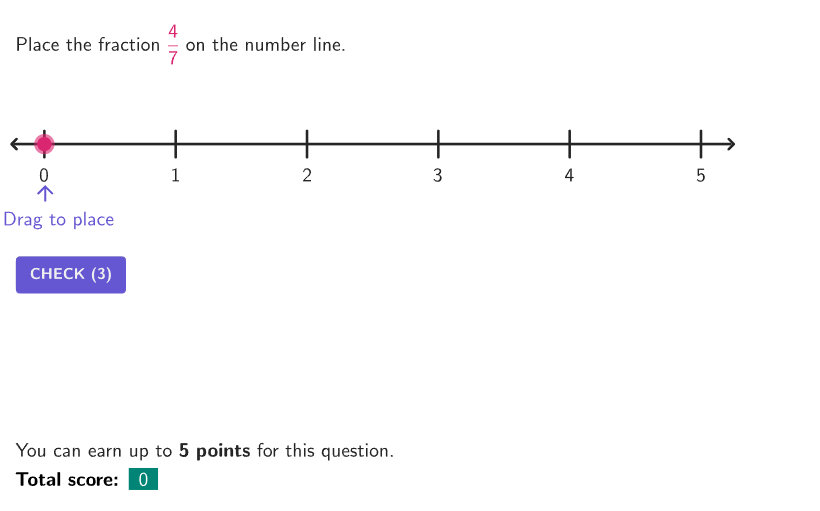
This example demonstrates how to accurately place fractions on a number line, helping students understand the concept of fractions. Key mathematical concepts include fraction representation, positional relationships on a number line, and the significance of fraction signs. Construction involves generating random fractions, marking numerators and denominators, determining fraction values, and distinguishing correct from incorrect fraction representations. Suitable for elementary students in grades 4-5 for math teaching and practice.
GeoGebra Commands & Parameters
RandomUniform(0, 0.99, 100) → randoms, {0.061086568206005845, 0.7454876325247419, 0.6891123238792186, 0.6331181889875717, 0.38901468447584914, 0.13400198625938942, 0.3769489648579937, 0.028389065572982635, 0.08622535697127742, 0.04002463875199692, 0.9201496270771712, 0.2730260139084504, 0.5453853697614985, 0.7352940177629129, 0.12916443341662157, 0.3785039626905352, 0.8247912998058993, 0.5885929095548394, 0.5988536627661185, 0.32430687956224025, 0.6823058227695206, 0.07384602999976152, 0.7116739113594375, 0.3073440902235071, 0.5026704975362466, 0.05708098388800172, 0.6517274133497443, 0.021538247550143656, 0.4526774671731118, 0.537093600597846, 0.83094861980353, 0.0030853399141988246, 0.25218796469265, 0.18777382372563436, 0.32080159243296263, 0.8323458757928095, 0.15717887607490635, 0.5353511881403473, 0.06464936770865169, 0.535972773941017, 0.14387959560364574, 0.7113092041791569, 0.6074302707170095, 0.9327158346821245, 0.7306297588558477, 0.731395183768044, 0.38043914192641626, 0.4133636110390849, 0.6263443336856035, 0.30301828193967906, 0.6998603679356443, 0.459493207058163, 0.08141559095495575, 0.10738017525265267, 0.6482371199312394, 0.9570939805710265, 0.9785128890134884, 0.17892370630287502, 0.08828567824134882, 0.07971640514894343, 0.777059144996868, 0.8531124092333632, 0.43837564486275676, 0.6915676566742667, 0.486168703851972, 0.23416887675662684, 0.5085968672502243, 0.41393506765680904, 0.7565250378505771, 0.7172030837990305, 0.9356207030513097, 0.758465283342213, 0.3820572235657327, 0.644151438474548, 0.12353782048755761, 0.19816013820571587, 0.37734265953119145, 0.22012558250147435, 0.94651708222857, 0.06147261973687648, 0.8764192979814307, 0.31613495161906907, 0.31747964129733675, 0.2265947152996034, 0.9431340337165534, 0.8956997761793618, 0.08501897925321576, 0.6719258518975891, 0.7222847927484232, 0.6566117741646744, 0.18852321641114464, 0.5647938988263155, 0.7946321306881157, 0.6750268914639159, 0.6788670659040027, 0.7137731713661779, 0.07736216938602963, 0.5971906442044087, 0.5991411235384028, 0.5504021126161253}Segment((-0.25, 0), (5.25, 0)) → numLinePoint(numLine) → PMoveStage1PointToPixels1(Corner[1], Corner[3], Corner[5], PMoveStage1) → PixelPMovePoint(Sequence[(A, 0), A, 0, 5, 1 / denom]) → PMoveStage2If(stage ≟ 1, x(PMoveStage1), x(PMoveStage2)) → xLocationIf(stage < 2, {x(PMoveStage1)}, {x(PMoveStage2)}) → inputCurrentCorner(5) → layoutAppSizePointToPixels(Corner[onboardingDisplayText, 2], Corner[1], Corner[3], Corner[5]) → layoutOnboardingonboardingTextOffset(Corner[onboardingText, 1], Corner[onboardingText, 3], onboardingCase, Corner[1], Corner[3], Corner[5]) → OnboardingTextOffsetSequence(Segment[(A, 0.1), (A, -0.1)], A, 0, 5, 1) → unitTicksSequence(Text[("" * A), (A, -0.1), true, true, 0, -1], A, 0, 5) → unitTextSequence(Segment[(A, 0.05), (A, -0.05)], A, 0, 5, 1 / denom) → subdivisionsexpandCircle(PMoveStage1, 7 + (7 * pulsing), Corner[1], Corner[3], Corner[5]) → pulsingObjectTableText({"\textbf{Total score:}", (((("\cellcolor{" * colorTealLight) * "}\textcolor{WHITE}{") * totalPoints) * "}"), If[countAttempts > 0, ((("for " * countAttempts) * " question") * If[countAttempts > 1, "s", ""]), ""]}, "c") → scoreCounterSegment(SolnPoint - (0, 0.3), SolnPoint - (0, 0.1)) → solnArrowText(("" * fracLatex), SolnPoint - (0, 0.4), true, true, 0, -1) → solnText
AI Drawing Prompt Reference
Draw a horizontal number line segment and include clear unit ticks and finer subdivision ticks across the marked interval (around 0 to 5). Add tick labels near the axis to indicate positions. Generate multiple random values in the range from 0 to 0.99, convert each value to its corresponding fraction location using a fixed denominator, and place a point at each fraction’s position on the number line. Display fraction notation (numerator over denominator) for the located fractions and visually distinguish correct versus incorrect fraction representations. Conclude by adding a solution arrow and a single LaTeX fraction text showing the final answer.
The prompt above was compiled from the original drawing commands and is for reference only.