
Lissajous Figure Intersection Demo
Loading the math board and drawing, please wait…
In collections
intersection: surface-surface, curve-curve
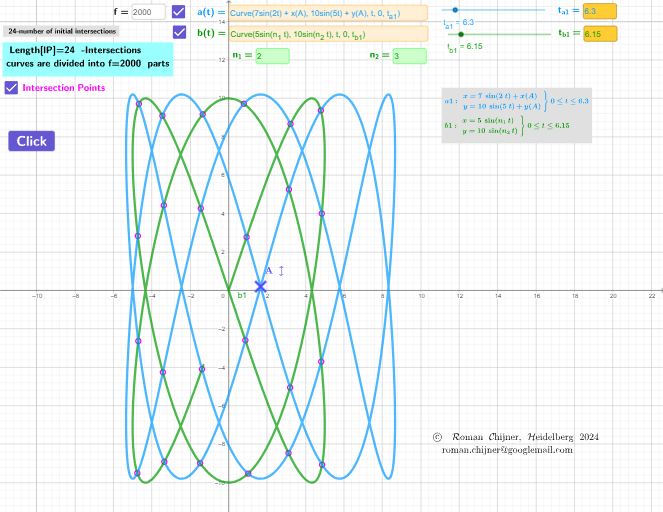
This example demonstrates the intersection points of two Lissajous figures. Key math concepts include parametric equations, trigonometric functions, and coordinate geometry. It is constructed using GeoGebra commands like Textfield, CurveCartesian, and LaTeX, with objects such as n_2, n_1, t_{b1}, and sliders for interactive exploration. Suitable for high school and above to understand parametric equations and function graph intersections.
GeoGebra Commands & Parameters
Textfield(h) → InputBox1CurveCartesian((5 * sin((n_1 * t))), (10 * sin((n_2 * t))), t, 0, t_{b1}) → b1CurveCartesian((7 * sin((2 * t))) + x(A), (10 * sin((5 * t))) + y(A), t, 0, t_{a1}) → a1LaTeX(a1, false, false) → text4aLaTeX(b1, false, false) → text4bTextfield(a1) → InputBox2Textfield(b1) → InputBox3Textfield(n_1) → InputBox4Textfield(n_2) → InputBox5Textfield(f) → InputBox6Textfield(t_{a1}) → InputBox7Textfield(t_{b1}) → InputBox8
AI Drawing Prompt Reference
Draw the intersection points of two Lissajous curves. The first curve is defined by parametric equations x=5*sin(n1*t) and y=10*sin(n2*t). The second curve is defined by x=7*sin(2*t)+x0 and y=10*sin(5*t)+y0. The intersection points depend on parameters n1, n2, and time t. Adjust these parameters to observe changes in intersection points. The graph should clearly show the intersection points and their surrounding areas.
The prompt above was compiled from the original drawing commands and is for reference only.