
Surface Plotter in Spherical Coordinates: Parameterized Surfaces
Loading the math board and drawing, please wait…
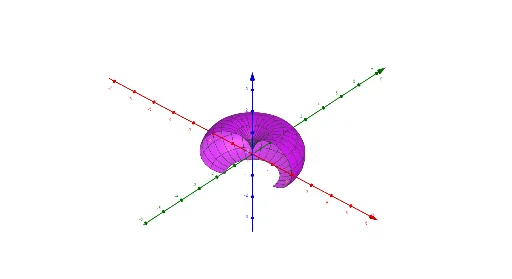
This example demonstrates how to plot a 3D surface in spherical coordinates, letting you visualize shapes governed by angular parameters. It centers on spherical-coordinate parametrization using (ρ, θ, φ) and the role of trigonometry in converting coordinate parameters into Cartesian geometry, as well as how changing parameters affects the resulting surface. Construction-wise, it uses GeoGebra’s Surface to generate the parametric surface, Textfield/Input objects to define parameters, and Intersect, Line, and Plane to build auxiliary geometric relations such as intersections and reference directions. A Rotate operation aligns orientations (e.g., sections or directions) to the intended view, and additional text labeling clarifies the meaning of key quantities and regions. Suitable for high school to early university learners studying coordinate geometry, 3D graphing, and parameterized surfaces.
GeoGebra Commands & Parameters
Surface(((ρ(θ, φ) * cos(θ)) * sin(φ)), ((ρ(θ, φ) * sin(θ)) * sin(φ)), (ρ(θ, φ) * cos(φ)), φ, φ_1, φ_2, θ, θ_1, θ_2) → aTextfield(ρ) → InputBox1Intersect(yAxis, xAxis) → ALine(A, (0, 0, 1)) → fRotate(B, θ_1, f) → B'Rotate(B, θ_2, f) → B'_{1}Plane(A, (0, 0, 1), B') → pPlane(A, (0, 0, 1), B'_{1}) → q
AI Drawing Prompt Reference
Create a 3D parametric surface using spherical-coordinate parametrization. Let the parameters be θ and φ, with a user-controlled radial function ρ(θ,φ); convert to Cartesian coordinates using trigonometry: (ρ·cosθ·sinφ, ρ·sinθ·sinφ, ρ·cosφ). Plot the resulting surface over specified angular ranges for θ and φ. Add auxiliary constructions for orientation: identify a reference point at the intersection of the coordinate axes, define a line passing through that point in the (0,0,1) direction, then form two rotated orientations by rotating around this line by two different θ values. Finally, draw two planes that each pass through the reference point, the same (0,0,1) direction, and one of the two rotated orientations, and include clear text labels for the key parameters/regions.
The prompt above was compiled from the original drawing commands and is for reference only.