
Linkage Curves Demo
Loading the math board and drawing, please wait…
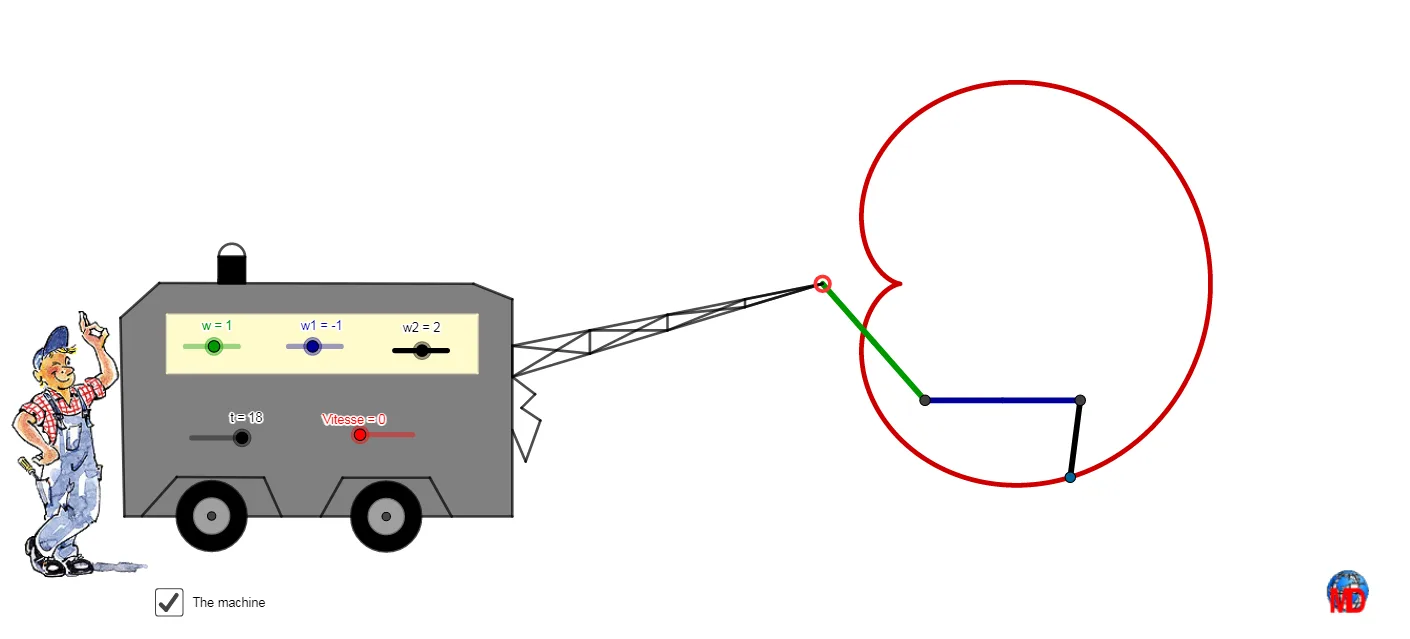
This example demonstrates the generation of complex curves through linkage mechanisms. It involves core mathematical concepts such as parametric equations, coordinate geometry, geometric transformations, and trigonometry. Key GeoGebra commands and objects used in the construction include Ray, Midpoint, Line, Intersect, Polygon, Centroid, Mirror, Circle, Point, Rotate, Segment, CurveCartesian, and Semicircle. It is suitable for high school and above students to learn about the creation process of parametric curves and the application of geometric transformations.
GeoGebra Commands & Parameters
Ray(T, C_1) → c_1Ray(S, B_1) → b_1Midpoint(J, T) → ZMidpoint(Z, T) → A_1Line(H, J) → a_1Line(U, a_1) → d_1Intersect(c_1, d_1) → E_1Intersect(b_1, d_1) → D_1Midpoint(S, I) → VMidpoint(V, S) → WPolygon(D_1, E_1, C_1, A_1, W, B_1) → poly1, e_1, f_2, g_2, h_2, w_1, i_2Midpoint(f_2) → J_1Centroid(poly1) → F_1Mirror(B_1, F_1) → G_1Midpoint(G_1, J_1) → L_1Midpoint(G_1, L_1) → M_1Midpoint(G_1, M_1) → V_1Line(A, xAxis) → nCircle(A, R) → cIntersect(c, n) → E, FPoint(c) → BCircle(A, R + r1) → dRotate(F, (t * w), A) → B'Ray(A, B') → aIntersect(d, a) → C,Circle(C, B') → eRotate(B', (t * w1) + 3.141592653589793, C) → B''Circle(C, r1 + r2) → fRay(C, B'') → bIntersect(f, b) → D,Circle(D, B'') → gRotate(B'', (t * w2) + 3.141592653589793, D) → B'''Segment(D, B''') → hSegment(C, B'') → iSegment(A, B') → jCurveCartesian(x(A) + ((R + r1) * (cos((w * i)) + cos((w1 * i)))), y(A) + ((R + r1) * (sin((w * i)) + sin((w1 * i)))), i, 0, t) → kCurveCartesian(x(A) + ((R + r1) * cos((w * i))) - (r1 * cos(((w1 + w) * i) + 3.141592653589793)), y(A) + ((R + r1) * sin((w * i))) - (r1 * sin(((w1 + w) * i) + 3.141592653589793)), i, 0, t) → oCurveCartesian(x(A) + ((R + r1) * cos((w * i))) - ((r1 + r2) * cos(((w1 + w) * i) + 3.141592653589793)) - (r2 * cos(((w + w1 + w2) * i) + 3.141592653589793)), y(A) + ((R + r1) * sin((w * i))) - ((r1 + r2) * sin(((w1 + w) * i) + 3.141592653589793)) - (r2 * sin(((w + w1 + w2) * i) + 3.141592653589793)), i, 0, t) → lCurveCartesian(x(A) + ((R + r1) * cos((w * i))) - ((r1 + r2) * cos(((w1 + w) * i) + 3.141592653589793)) - (r2 * cos(((w + w1 + w2) * i) + 3.141592653589793)), y(A) + ((R + r1) * sin((w * i))) - ((r1 + r2) * sin(((w1 + w) * i) + 3.141592653589793)) - (r2 * sin(((w + w1 + w2) * i) + 3.141592653589793)), i, 0, t) → mPoint(j) → GSegment(E, G) → sSegment(B', C) → f_1Segment(B'', D) → g_1Segment(D, B''') → h_1Polygon(I, A, J) → t1, p, q, rMidpoint(q) → KMidpoint(J, K) → LMidpoint(p) → MMidpoint(I, M) → NMidpoint(q) → OMidpoint(A, K) → PMidpoint(A, M) → QSegment(I, L) → i_1Segment(L, M) → j_1Segment(M, P) → k_1Segment(P, A) → l_1Segment(J, N) → m_1Segment(N, K) → n_1Segment(K, Q) → p_1Segment(Q, A) → q_1Segment(N, L) → r_1Segment(M, K) → s_1Segment(P, Q) → t_1Mirror(A_1, F_1) → H_1Mirror(W, F_1) → W'Mirror(C_1, F_1) → I_1Midpoint(J_1, C_1) → K_1Midpoint(L_1, J_1) → N_1Midpoint(J_1, K_1) → O_1Midpoint(K_1, C_1) → P_1Segment(Q_1, R_1) → k_2Midpoint(N_1, J_1) → W_1Midpoint(J_1, O_1) → Z_1Midpoint(P_1, C_1) → A_2Segment(R_1, W_1) → l_2Segment(Z_1, T_1) → m_2Segment(T_1, U_1) → n_2Segment(U_1, A_2) → p_2Polygon(B_1, W, T, E_1, H_1, I_1) → poly2, q_2, w_2, t_2, r_2, s_2, a_2Midpoint(E_1, G_1) → B_2Segment(Q_1, B_2) → j_2Midpoint(O_1, K_1) → C_2Midpoint(C_2, O_1) → D_2Midpoint(M_1, L_1) → E_2Circle(E_2, V_1) → d_2Circle(K_1, Distance[E_2, V_1]) → c_2Circle(E_2, M_1) → e_2Circle(K_1, Distance[E_2, M_1]) → c_3Point(a_2) → F_2Point(a_2) → G_2Polygon(F_2, G_2, 4) → poly3, b_2, f_3, g_3, h_3, H_2, I_2Semicircle(I_2, H_2) → d_3Semicircle(I_2, H_2) → e_3Point(w_2) → N_2Intersect(q, m_1) → O_2Segment(N_2, J_2) → i_3Segment(J_2, K_2) → j_3Segment(K_2, L_2) → k_3Segment(L_2, M_2) → l_3Segment(M_2, O_2) → m_3Polygon(Q_2, P_2, S_2, R_2) → q1, n_3, p_3, q_3, r_3
AI Drawing Prompt Reference
Draw a coordinate-plane linkage-style curve composition: start from a reference point A on the plane, and construct several concentric circles centered at A with radii R, R+r1, and R+r1+r2. Define a few rays/lines through A and use their intersections with these circles to obtain key points and rotation centers. Rotate selected points around the appropriate centers with fixed angular parameters (progressing through multiple stages such as B', then B'', then B'''), and connect some of these points with line segments. Finally, create multiple parametric curves using parameter i from 0 to t, each defined relative to A and built from combinations of cosine and sine terms with the given radii and angular frequencies (w, w1, w2), resulting in a set of complex linkage-like trajectories.
The prompt above was compiled from the original drawing commands and is for reference only.