
Linear Pair of Angles Dynamic Demonstration
Loading the math board and drawing, please wait…
In collections
CLASS IX CBSE MATHS ACTIVITIES
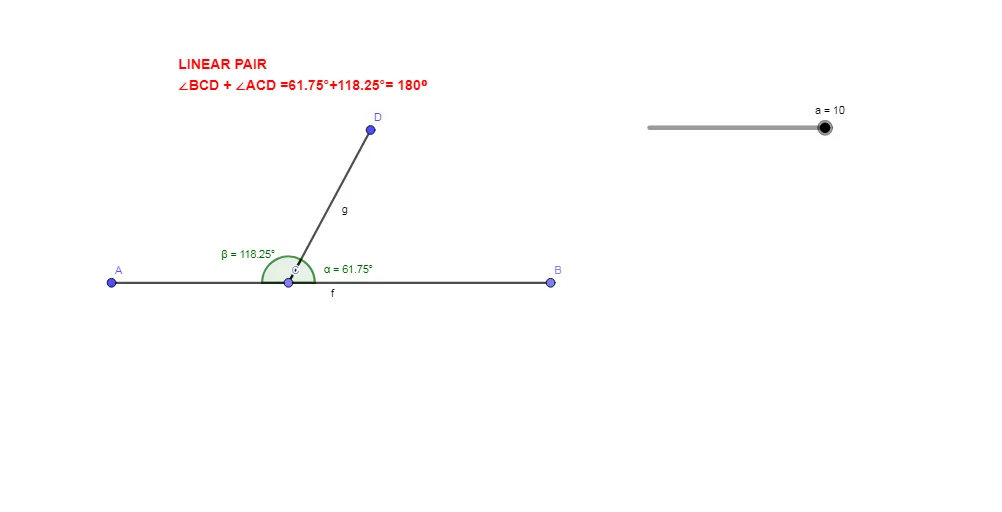
This GeoGebra example dynamically demonstrates the linear pair of angles formed by two intersecting lines. The core mathematical concept is the definition of a linear pair: two adjacent angles share a common side, and their non-common sides are opposite rays, so the sum of the two angles is always 180°. Construction details: the Point command creates points A, B, C, D; the Segment command constructs segments a, f, g; the Angle command marks angles α and β; and text1 displays the angle measures. This is suitable for middle school geometry lessons to visually understand the properties of linear pairs, supplementary angles, and angle relationships at intersecting lines. It can also be used for interactive classroom demonstrations or student self-exploration.
GeoGebra Commands & Parameters
Point(Circle[A, a]) → BSegment(A, B) → fPoint(f) → CSegment(C, D) → gAngle(B, C, D) → αAngle(D, C, A) → β
AI Drawing Prompt Reference
Draw two intersecting lines and form four angles at their intersection point. Label two adjacent angles and display their measures, demonstrating that their sum is always 180 degrees to illustrate the concept of a linear pair, where adjacent angles share a common side and their non-common sides are opposite rays.
The prompt above was compiled from the original drawing commands and is for reference only.