
Explore the Gradients of Perpendicular Lines
Loading the math board and drawing, please wait…
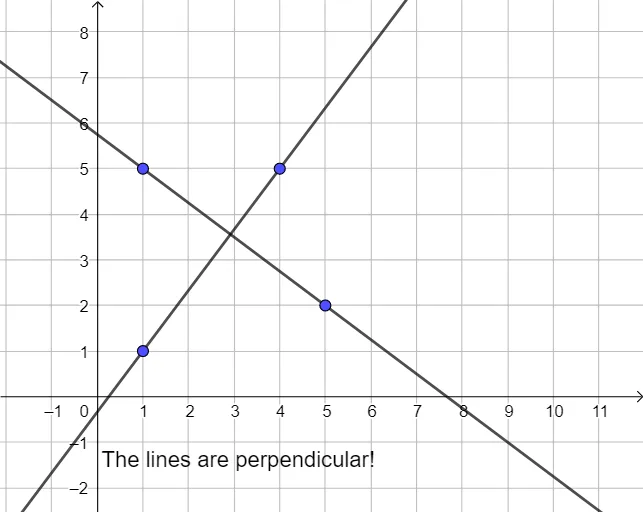
This GeoGebra example dynamically demonstrates the fundamental property that the product of the slopes of two perpendicular lines equals -1. It visually shows how the slope of one line changes as the other line rotates around a fixed point, helping students grasp the algebraic condition for perpendicularity in coordinate geometry. Core mathematical concepts include slope, perpendicularity, right angles, and geometric visualization in the Cartesian plane. The construction uses the Line command to create two lines, the Angle command to mark the right angle between them, with points A, B, C, D as control points, lines f and g representing the perpendicular pair, text1 displaying slope values, and α denoting the right angle. Suitable for upper middle school or high school students learning linear equations and slopes, this interactive tool is ideal for classroom demonstrations or self-directed exploration—by dragging points, learners can observe how slopes change and reinforce their understanding of perpendicular line relationships.
GeoGebra Commands & Parameters
Line(C, D) → fLine(A, B) → gAngle(g, f) → α
AI Drawing Prompt Reference
In a Cartesian coordinate plane, draw two draggable lines that remain perpendicular to each other at all times. Mark a right angle symbol at the intersection point of these two lines to clearly show their perpendicular relationship. Include a text display that dynamically shows the slope values of both lines, allowing students to observe how one line's slope changes as it rotates around a fixed point and how the other line's slope adjusts accordingly, thereby intuitively understanding the algebraic property that the product of slopes of perpendicular lines equals negative one.
The prompt above was compiled from the original drawing commands and is for reference only.