
Linear Functions Practice by Mathguru
Loading the math board and drawing, please wait…
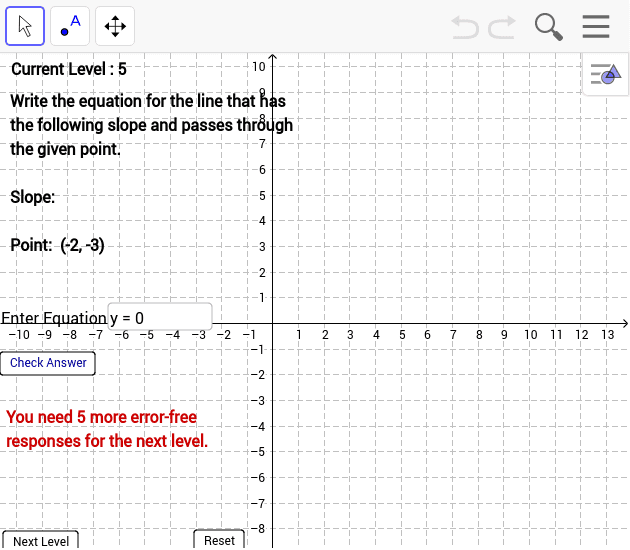
This example is a student‑practice version of the Linear Function applet, allowing learners to explore and master linear equations through interactive graphing. It covers key concepts such as the definition of linear functions, line representation on the coordinate plane, slope‑intercept relationships, and dynamic changes of the graph as parameters vary. The construction uses GeoGebra commands like RandomElement, Line, Random, Textfield, If, and FractionText to generate random linear functions, and includes Reset and Next Level buttons for structured practice. Designed for middle‑school and high‑school mathematics classes, it supports lessons on functions, coordinate geometry, and dynamic geometry skills.
GeoGebra Commands & Parameters
RandomElement({-8, -7, -6, -5, -4, -3, -2, -1, 1, 2, 3, 4, 5, 6, 7, 8}) → aRandomElement({-8, -7, -6, -5, -4, -3, -2, -1, 1, 2, 3, 4, 5, 6, 7, 8}) → bRandomElement({-8, -7, -6, -5, -4, -3, -2, -1, 1, 2, 3, 4, 5, 6, 7, 8}) → cRandomElement({-8, -7, -6, -5, -4, -3, -2, -1, 1, 2, 3, 4, 5, 6, 7, 8}) → dLine(G, H) → nLine(E, B) → kLine(A, B) → eLine(C, D) → hRandom(1, 20) → n1Random(1, 20) → n2Random(1, 20) → n3Random(1, 20) → n4Random(1, 20) → n5Random(1, 20) → nxCell(2, ActualLevel + 1) → LevelTotalTextfield(AnswerNum) → inputBox1If(e ≟ h ∧ g ∧ (C ≠ D), true, false) → C2If(e ≟ h ∧ g ∧ ActualLevel ≟ 2, true, false) → C3If(e ≟ j ∧ ActualLevel ≟ 3 ∧ g, true, false) → C4If(e ≟ j ∧ ActualLevel ≟ 4 ∧ g, true, false) → C5If(k ≟ j ∧ ActualLevel ≟ 5 ∧ g, true, false) → C6If(k ≟ j ∧ ActualLevel ≟ 6 ∧ g, true, false) → C7If(j ≟ n ∧ ActualLevel ≟ 7 ∧ g, true, false) → C8FractionText(abs(y(B) / x(A))) → text1If(y(B) < 0, "-", "+") → Text3If(y(B) / x(A) > 0, "-", "") → text4Textfield(j) → inputBox2FractionText(abs(y(B) / x(A))) → absslopeIf((C2 ≟ false ∧ ActualLevel ≟ 1 ∨ C3 ≟ false ∧ ActualLevel ≟ 2 ∨ C4 ≟ false ∧ ActualLevel ≟ 3 ∨ C5 ≟ false ∧ ActualLevel ≟ 4 ∨ C6 ≟ false ∧ ActualLevel ≟ 5 ∨ C7 ≟ false ∧ ActualLevel ≟ 6 ∨ C8 ≟ false ∧ ActualLevel ≟ 7) ∧ g, true, false) → AnswerWrongIf(C2 ≟ true ∧ ActualLevel ≟ 1 ∨ C3 ≟ true ∧ ActualLevel ≟ 2 ∨ C4 ≟ true ∧ ActualLevel ≟ 3 ∨ C5 ≟ true ∧ ActualLevel ≟ 4 ∨ C6 ≟ true ∧ ActualLevel ≟ 5 ∨ C7 ≟ true ∧ ActualLevel ≟ 6 ∨ C8 ≟ true ∧ ActualLevel ≟ 7, true, false) → AnswerCorrectRandomElement({-8, -7, -6, -5, -4, -3, -2, -1, 1, 2, 3, 4, 5, 6, 7, 8}) → o
AI Drawing Prompt Reference
Create an interactive linear function practice figure that randomly generates several lines on a coordinate plane, letting learners drag points or enter slope and intercept values to see the lines change dynamically; include text input boxes for answers, reset and next‑level buttons to control the exercise flow, and automatic checking that indicates whether each answer is correct for the current level.
The prompt above was compiled from the original drawing commands and is for reference only.