
Lesson Plan: Right Triangle Properties – Dynamic Geometry Exploration
Loading the math board and drawing, please wait…
In collections
Right Triangle Properties
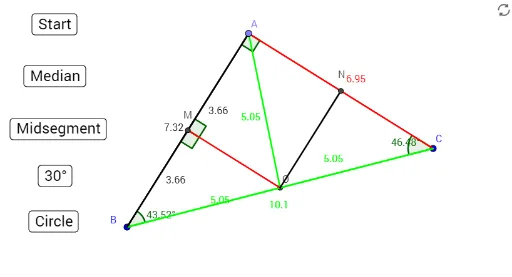
This GeoGebra interactive lesson plan focuses on demonstrating the fundamental properties of right triangles through dynamic construction and measurement. It visually illustrates relationships among sides and angles, the sum of interior angles being 180°, and properties of special segments like medians and altitudes. Core mathematical concepts include the definition of right triangles, geometric verification of the Pythagorean theorem, introductory trigonometric ratios (sine, cosine, tangent), and the triangle angle sum theorem. The construction summary reveals the use of basic GeoGebra commands such as Midpoint, Circle, Point, Intersect, Segment, and Angle, along with multiple buttons (button1 to button5) to control step-by-step animations or toggles. Key objects include vertices A, B, C, center O, auxiliary circle c, and angles α, β, γ. This resource is ideal for middle school or high school geometry classes, enabling students to explore, conjecture, and verify right triangle properties interactively. It also serves as a practical example of combining geometric construction with interactive controls in GeoGebra.
GeoGebra Commands & Parameters
Midpoint(B, C) → OCircle(O, B) → cPoint(c) → ACircle(B, O) → dIntersect(c, d, 2) → DSegment(A, B) → fSegment(B, C) → gSegment(C, A) → hSegment(A, O) → iAngle(C, B, A) → γAngle(A, C, B) → βAngle(B, A, C) → αSegment(O, B) → jSegment(O, C) → kMidpoint(f) → MMidpoint(h) → NSegment(M, O) → lSegment(N, O) → mSegment(A, M) → pSegment(B, M) → qAngle(B, M, O) → δAngle(O, M, A) → ε
AI Drawing Prompt Reference
Draw a right triangle to illustrate its fundamental properties. Start by constructing the two legs, then draw a circle centered at the right angle vertex intersecting the hypotenuse at another point. Find the midpoint of the hypotenuse and draw a circle centered there, intersecting the first circle at a new point. Connect all points to form the triangle, labeling the vertices and centers. Measure and display the three interior angles to show they sum to 180 degrees. Draw the medians and altitudes, marking the midpoints and intersections. Finally, include the auxiliary circle and show the relationships between angles and segments, displaying their measurements.
The prompt above was compiled from the original drawing commands and is for reference only.