
Learning Ellipse Interactive Tool
Loading the math board and drawing, please wait…
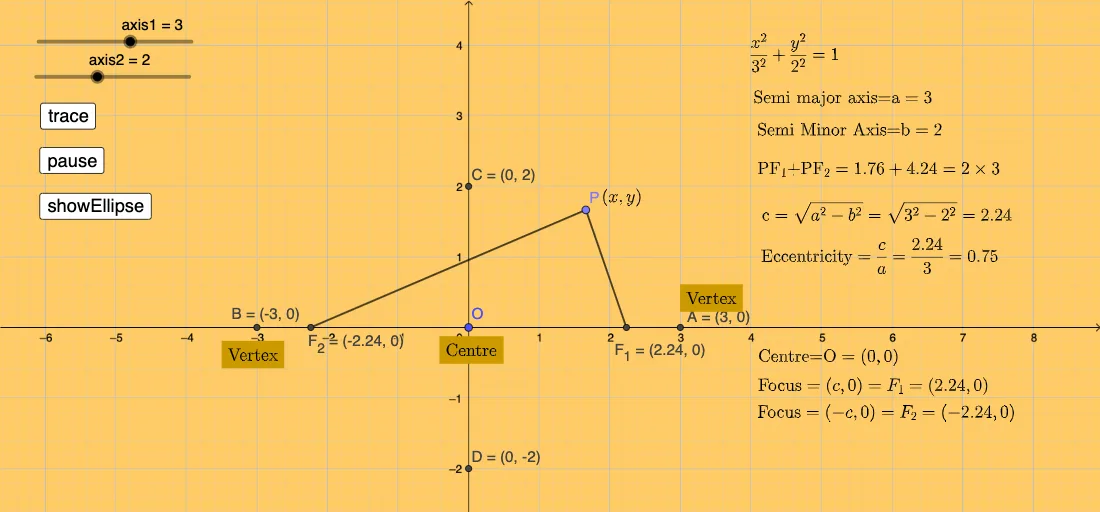
① This interactive GeoGebra example demonstrates the fundamental definition and geometric properties of an ellipse through dynamic manipulation. ② Core mathematical concepts include the standard equation of an ellipse, foci, major and minor axes, eccentricity, and the property that the sum of distances from any point on the ellipse to the two foci is constant. ③ Construction details: The example uses GeoGebra commands such as If, Point, and Segment to create a movable point P on the ellipse, foci F1 and F2, semi-major and semi-minor axes, and includes buttons to toggle the ellipse's visibility and sliders to adjust eccentricity, with real-time text updates. ④ Suitable for high school analytic geometry teaching and introductory college geometry, providing an intuitive visual aid for understanding how parameter changes affect the ellipse's shape.
GeoGebra Commands & Parameters
If(axis1 > axis2, axis1, axis2) → semimajoraxisIf(axis1 < axis2, axis1, axis2) → semiminoraxisIf(axis1 > axis2, (c, 0), (0, c)) → F_{1}If(axis1 > axis2, ((-c), 0), (0, (-c))) → F_{2}Point(eq1) → PSegment(P, F_{2}) → fSegment(P, F_{1}) → g
AI Drawing Prompt Reference
Create an interactive ellipse tool with adjustable semi-major and semi-minor axes. The longer axis determines the major axis, and the shorter one the minor axis. Place two foci along the major axis, with their distance from the center controlled by an eccentricity slider. Add a movable point on the ellipse, connected to both foci by line segments, showing that the sum of distances is constant. Include sliders for eccentricity and a button to toggle ellipse visibility, with live text updates.
The prompt above was compiled from the original drawing commands and is for reference only.