
Law of Sines & Area Interactive Investigation
Loading the math board and drawing, please wait…
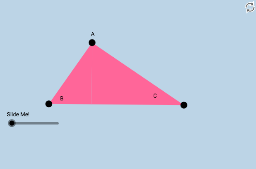
This example demonstrates the Law of Sines and triangle area calculation through interactive exploration. Key math concepts include the Law of Sines, triangle area formulas, and geometric transformations. GeoGebra commands and objects used are Polygon, Midpoint, Rotate, Segment, Line, OrthogonalLine, Intersect, Dilate, and Angle. Suitable for high school mathematics education to visually aid understanding of the Law of Sines and area calculations.
GeoGebra Commands & Parameters
Polygon(A, B, C) → poly1, c_2, a, b_3Midpoint(b_3) → DRotate(A, α, D) → A'Rotate(B, α, D) → B'Rotate(C, α, D) → C'Polygon(A', B', C') → poly1', c', a', b'Segment(A, D) → iSegment(D, C) → jSegment(C, B) → kSegment(B, A) → lSegment(A', B') → gSegment(B', C') → mLine(B, C) → fLine(B, A) → h_1Line(A, C) → nOrthogonalLine(A, f) → pOrthogonalLine(B, n) → qOrthogonalLine(C, h_1) → rIntersect(f, p) → EIntersect(n, q) → FIntersect(h_1, r) → GDilate(A, If[0 < d ≤ 1, 1 - d, 0], E) → A'_1Segment(A, A'_1) → heightPolygon(B, E, A) → poly2, a_1, b_1, ePolygon(E, A, C) → poly3, c_1, e_1, a_2Angle(A, E, B) → βPolygon(B, E, A) → poly4, a_3, b_2, e_2Dilate(B, If[0 < d ≤ 1, 1 - d, 0], E) → B'_1Dilate(B, If[0 < d ≤ 1, 1 - d, 0], A) → B'_2Segment(B, B'_1) → hSegment(B, B'_2) → cSegment(A, C) → b
AI Drawing Prompt Reference
Draw a triangle and rotate it about the midpoint of one side by a variable angle, creating a second triangle. Connect the original vertices to the midpoint and draw segments between corresponding vertices of the two triangles. From each original vertex, drop a perpendicular to the opposite side, marking the foot. Using one foot as a center, dilate a vertex along the perpendicular by a slider-controlled factor to show the altitude. Shade the original triangle, the rotated triangle, and the two smaller triangles formed by the altitude, and mark a right angle at one foot.
The prompt above was compiled from the original drawing commands and is for reference only.