
Law of Cosines Application: Piston and Crankshaft Animation
Loading the math board and drawing, please wait…
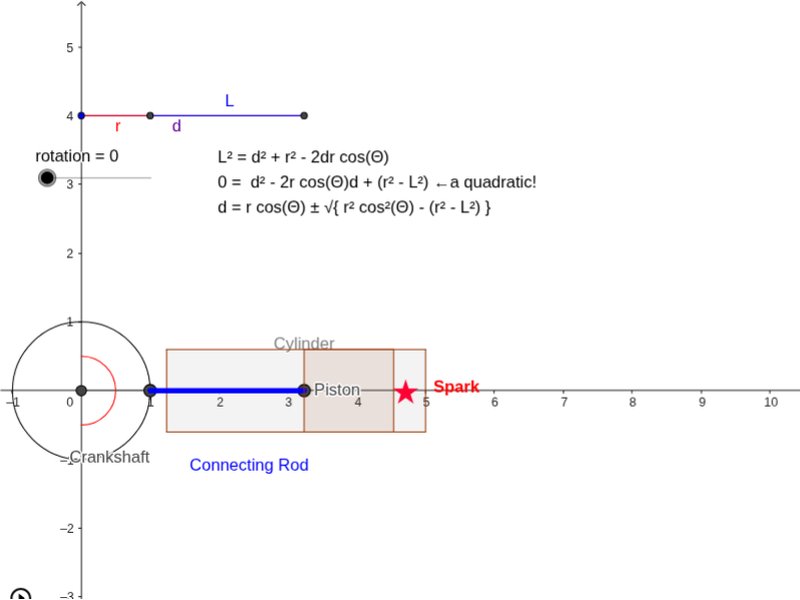
This example demonstrates the application of the Law of Cosines through an animation of a piston and crankshaft mechanism. It involves the use of commands such as Circle, Segment, and Angle. Suitable for high school mathematics education, particularly in coordinate geometry and trigonometry.
GeoGebra Commands & Parameters
Circle((0, 0), 1) → cPolygon((1.24, 0.6), (5, 0.6), (5, -0.6), (1.24, -0.6)) → Cylinder, g, i, j, lSegment(Pwheel, Pd) → LPolygon((x(Pd), -0.6), (x(Pd), 0.6), (x(Pd) + 1.3, 0.6), (x(Pd) + 1.3, -0.6)) → Piston, a, b, e, fCircle(O, 0.5) → hArc(h, (cos(rotation - π / 2), sin(rotation - π / 2)), (cos(rotation + π / 2), sin(rotation + π / 2))) → kSegment(O, Pwheel) → Pseg1Segment(O, Pd) → Pseg2Segment(Po', Pd') → Tseg1Segment(Pwheel', Pd') → Tseg3Segment(Po', Pwheel') → Tseg2Angle(Tseg1, Tseg2) → Θ
AI Drawing Prompt Reference
Draw an animation of a piston and crankshaft mechanism, including a circle with radius 1, a polygon representing the crankshaft, and a rectangle representing the piston. There is an arc rotating around the center of the circle with an angle of rotation - π/2. Finally, draw two line segments connecting the crankshaft and the piston, and their angle.
The prompt above was compiled from the original drawing commands and is for reference only.